



Most agencies don't fail at automation because they picked the wrong tool. They fail because they picked something that works fine at 40 bookings a month and quietly falls apart at 300 — usually right when a supplier changes an invoice format, or a payment reminder fires twice and makes the agency look sloppy to a client.
So this isn't a "top 10 tools" roundup. It's a comparison of three specific stacks that small travel agencies actually run, with the trade-offs laid out at three volume tiers, the exact trigger-to-error-handling flows for the three workflows that matter most, and the migration signals that tell you it's time to move up before things break.
The three stacks:
Quick verdict: who each stack is for
The three stacks:
-
Stack A — Zapier + Google Sheets. The "get something working this week" option.
-
Stack B — Make (Integromat) + a lightweight database (Sheets, Airtable, or a small hosted Postgres). The "I have real volume and need branching logic" option.
-
Stack C — a native travel SaaS with automations built in. The "I don't want to be the integration engineer anymore" option.
| Stack | Who this is best for | Breaks down when… |
|---|---|---|
| A — Zapier + Sheets | Solo agents or 2–3 person shops under ~75 bookings/month who need speed over structure | You need multi‑step branching, or two people edit the same sheet at once |
| B — Make + lightweight DB | Growing agencies at ~75–500 bookings/month who need conditional logic, OCR, and cleaner data | Nobody on the team owns the scenarios, or reconciliation becomes a full‑time job |
| C — Native travel SaaS | Agencies past ~300–500 bookings/month, or any size that wants supplier/payment/itinerary data in one system | You have highly custom supplier feeds the SaaS can't model, or budget is genuinely tight |
The volume ranges overlap on purpose. A 200-booking luxury agency with 6 suppliers per trip has more operational complexity than a 400-booking group tour operator running one product type. Volume is a signal, not a rule.
The three workflows every stack has to handle
Before comparing tools, get clear on what you're actually automating. These three workflows cause the most manual pain and the most costly mistakes across small agencies:
Eliminate booking chaos and streamline operations.
Travexly helps you manage, confirm, and track travel bookings effortlessly.
- Unified booking management
- Automated client communications
- Team scheduling & itinerary tracking
No credit card required
-
Booking confirmation — client pays deposit, confirmation goes out, records get written.
-
Payment milestone reminders — the deposit → interim → final balance sequence.
-
Supplier invoice pulls — getting invoices out of email/portals and into something reconcilable.
Each stack gets walked through all three using the same format: Trigger → Actions → Data writes → Error handling. That structure is the whole game. Most broken automations aren't broken at the trigger — they're broken because nobody defined what happens when a step fails.
Stack A: Zapier + Google Sheets
Workflow 1 — Booking confirmation
-
Trigger New paid deposit in your payment processor (Stripe/Square webhook via Zapier).
-
Actions
-
Data writes Append a row to
Bookings, updatelast_activityon the client row. -
Error handling Zapier's built-in auto-replay handles transient failures. For the lookup-then-create step, add a filter so you don't create duplicate clients when the email has a trailing space or different casing. Turn on Zapier error email alerts — a failed Zap that sits silent for three days is worse than one that never ran.
-
Look up client by email in the Clients sheet.
-
If not found, create a new client row.
-
Generate a booking reference (formula or a Zapier "Formatter" step).
-
Send confirmation email (Gmail/your ESP).
The duplicate-client problem is the number one thing that bites Sheets-based setups. "sara@" and "Sara@" become two customers. Normalize the email to lowercase in a Formatter step before the lookup.
Normalize the email to lowercase in a Formatter step before the lookup.
Workflow 2 — Payment milestone reminders
-
Trigger Scheduled Zap (daily) that scans the
Bookingssheet. -
Actions Filter for rows where
nextpaymentdueis within 7 days andreminder_sentis blank → send reminder email. -
Data writes Set
reminder_sent = todayon that row. -
Error handling The
reminder_sentflag is the critical piece. Without it, a daily scan re-sends the same reminder every morning. Clients notice. Always write the "done" flag in the same run that sends the email.
Workflow 3 — Supplier invoice pulls
-
Trigger New email in a dedicated Gmail label (e.g.
invoices/). -
Actions Extract attachment → this is where Sheets shows its ceiling. Zapier can hand the PDF to an OCR/parsing add-on, but Stack A has no real branching for "confidence is low."
-
Data writes Append parsed fields to an
Invoicessheet. -
Error handling Route anything you can't parse cleanly to a
Needs Reviewtab. Don't let it write garbage into your main invoice sheet.
Honest take: invoice pulls are where Stack A struggles. If suppliers send consistent, clean PDFs, it's fine. If you've got 15 suppliers with 15 formats, you'll be doing manual cleanup constantly — and that's your first migration signal.
Stack B: Make + lightweight DB (Sheets / Airtable / Postgres)
Make gives you visual branching, routers, and error handlers per module — which is exactly what invoice pulls and multi-step payment logic need.
Workflow 1 — Booking confirmation
-
Trigger Payment processor webhook.
-
Actions
-
Data writes
Bookingslinked toClientsandSuppliers(Airtable's linked records remove the duplicate-lookup mess Sheets suffers from). -
Error handling Wrap the create/update in a Make error handler route with a "resume/retry" directive, and a fallback that posts failed payloads to a Slack channel or a
DLQtable. That dead-letter table is what separates a grown-up setup from a hobby one.
-
Search client in Airtable.
-
Router found → update path; not found → create path.
-
Create booking record with linked supplier records.
-
Send confirmation.
Workflow 2 — Payment milestone reminders
-
Trigger Scheduled scenario.
-
Actions Query records where
nextpaymentdue≤ today+7 andreminderstage < currentstage. Branch by stage (deposit vs interim vs final) so the tone and content differ. -
Data writes Increment
reminder_stage, log to aCommsLogtable with timestamp. -
Error handling Cap retries at 3. Log the client, stage, and error to
CommsLogso you can prove what was sent and when — useful when a client claims they never received a balance notice.
-
Query records where
nextpaymentdue≤ today+7 andreminderstage < currentstage. -
Branch by stage (deposit vs interim vs final) and send stage-appropriate reminder.
-
Increment
reminder_stageand log toCommsLog.
Workflow 3 — Supplier invoice pulls (the reason to use Make)
-
Trigger New email in monitored inbox/label.
-
Actions
-
Data writes
Invoicesrecord linked to the matchedBooking. -
Error handling Unmatched invoices go to a review queue, not into the void. Amount mismatches beyond a threshold (say >2%) auto-flag rather than auto-approve.
-
Send attachment to OCR (Make has built-in and third-party OCR modules).
-
Router on confidence score high → auto-write; medium → write + flag; low → route to
Needs Review. -
Match invoice to booking by supplier + reference + amount.
Visual flow for the Make invoice pull process:
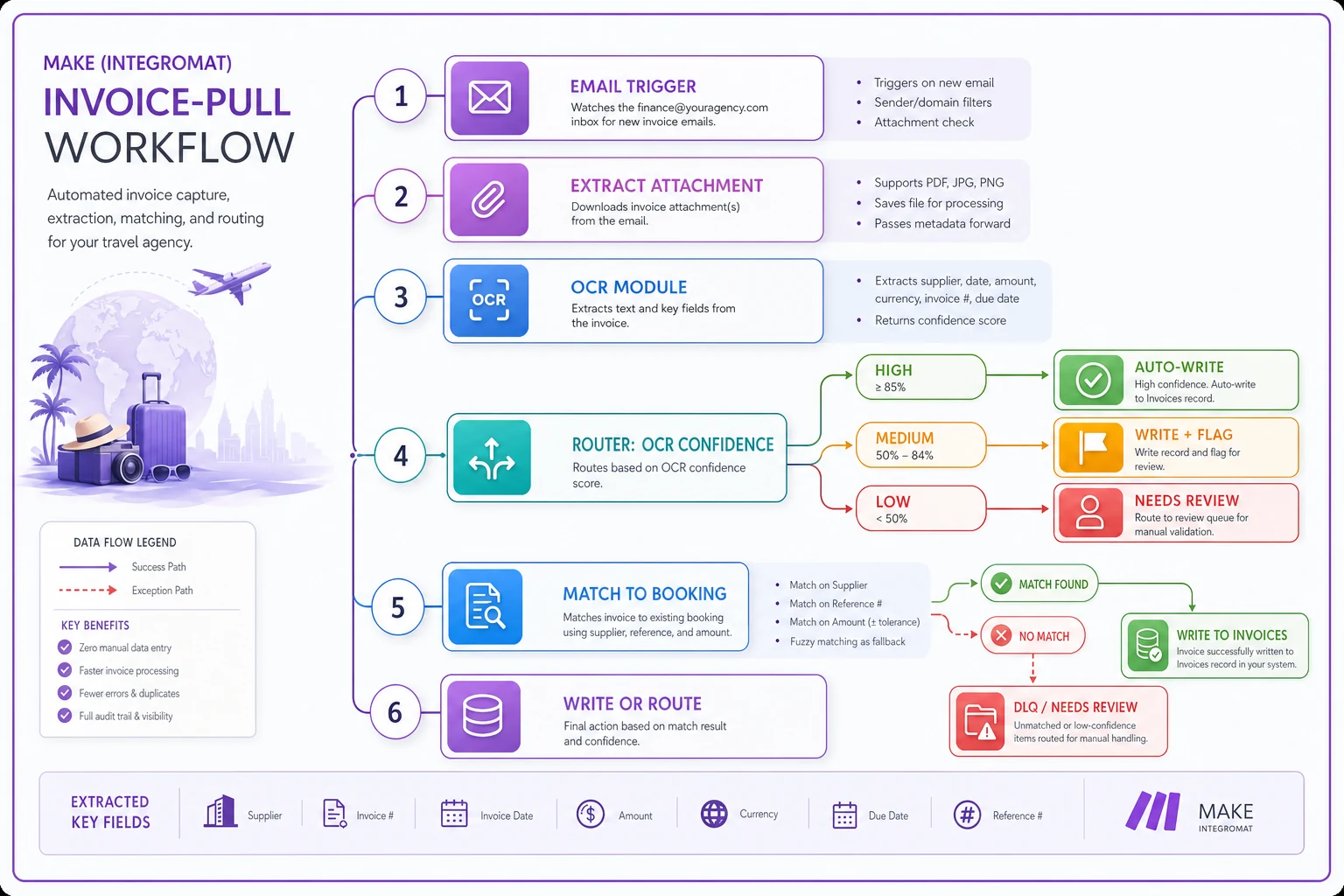
For the reconciliation side — matching what you expected to pay against what suppliers actually billed — this logic pairs directly with a proper supplier-feed setup. If your feeds themselves are unreliable, automation just moves the mess faster.
Stack C: Native travel SaaS with built‑in automations
Here the booking, client, supplier, and payment records already live in one system, so most of the "data writes" step disappears — the automation is configured, not built from scratch.
Workflow 1 — Booking confirmation
-
Trigger Booking status flips to "Confirmed/Paid" inside the platform.
-
Actions Templated confirmation fires automatically; itinerary attaches from stored trip data.
-
Data writes Native — no external sheet syncing.
-
Error handling Failures surface in the platform's activity/audit log. Your job shifts from "build retries" to "check the log."
Workflow 2 — Payment milestone reminders
-
Trigger Payment schedule attached to the booking.
-
Actions Reminders fire per the schedule; card-on-file platforms can even auto-charge with client consent.
-
Data writes Native ledger.
-
Error handling Failed charges auto-flag; dunning sequences are usually built in.
Workflow 3 — Supplier invoice pulls
-
Trigger Invoice upload or connected supplier/GDS feed.
-
Actions Built-in reconciliation against the booking's expected cost.
-
Data writes Native.
-
Error handling Exceptions land in a reconciliation dashboard.
The catch: you trade flexibility for convenience. If one supplier sends invoices in a format the SaaS can't ingest, you're back to manual entry — and you can't just build a custom parser the way you could in Make.
Sample datastore schema (works for A and B)
Clients
-
client_id(unique) -
full_name -
email(lowercased) -
phone -
created_at -
last_activity
Bookings
-
booking_id -
client_id(link) -
status -
trip_start -
trip_end -
total_amount -
deposit_amount -
nextpaymentdue -
reminder_stage -
created_at
Suppliers
-
supplier_id -
name -
type(hotel/air/tour/transfer) -
contact_email
Invoices
-
invoice_id -
supplier_id(link) -
booking_id(link) -
invoice_number -
amount -
currency -
ocr_confidence -
match_status -
received_at
CommsLog
-
log_id -
booking_id -
type -
stage -
sent_at -
status
The single most important field people skip is ocr_confidence. Store it. It's how you audit your invoice automation later.
Worked cost examples at 50 / 200 / 1,000 bookings/month
Rough monthly ranges. Actual pricing shifts with tiers and add-ons, so treat these as planning numbers, not quotes. Assume each booking touches 3–5 automation tasks (confirmation, 2–3 reminders, invoice parse).
| Volume | Stack A (Zapier + Sheets) | Stack B (Make + Airtable) | Stack C (Native SaaS) |
|---|---|---|---|
| 50/mo (~200–300 tasks) | ~$20–30 (Starter) | ~$10–20 (Make core + Airtable free/team) | ~$50–150 (entry seat pricing) |
| 200/mo (~800–1,200 tasks) | ~$50–75 (task ceilings start hurting) | ~$30–60 | ~$150–400 |
| 1,000/mo (~4,000–6,000 tasks) | ~$150–300+ and painful to maintain | ~$100–200 (operations pricing is efficient at scale) | ~$400–1,000+ (but replaces multiple tools) |
Stack A is cheapest at 50 and worst-value at 1,000. Make's operations-based pricing scales more gracefully. The native SaaS looks expensive until you count the three or four subscriptions and the hours of manual reconciliation it replaces. The hidden cost nobody budgets for in A and B is your time maintaining it. At 1,000 bookings, if someone spends 6–8 hours a week babysitting Zaps, that labor dwarfs the subscription difference.
Email / filter templates
Gmail filter to isolate supplier invoices:
Matches: from:(billing OR invoices OR accounts) subject:(invoice OR statement) has:attachment Do this: Apply label "invoices/", Skip Inbox
Payment reminder (interim balance) — plain and specific:
Subject: Balance update for [Trip Name] — [bookingid] Hi [firstname], A quick note that the next payment of [amount] for your [tripstart] trip is due on [nextpayment_due]. You can pay here: [link] Reply if anything's changed and we'll sort it out. — [Agency]
Keep reminders short and reference the booking ID. Long, salesy reminders get ignored. A two-line note with a due date and a link gets paid.
OCR and data‑quality guidance
If you're parsing supplier invoices, set explicit confidence thresholds instead of trusting whatever the OCR outputs:
-
≥ 90% confidence auto-write to
Invoices. -
70–89% write, but set
match_status = review. -
< 70% route to
Needs Review, do not write to the ledger.
Typical real-world error rates: clean, digital PDFs from a consistent supplier parse at 95%+ accuracy. Scanned or photographed invoices drop to 80–90%. Multi-currency invoices with symbols the OCR misreads are the usual culprit for wrong amounts — always validate currency and amount together.
The mistake to avoid: auto-approving everything to "save time." One wrong decimal on a $4,200 hotel invoice read as $420 (or $42,000) will cost you far more than the review queue ever saves.
Accounting integration mapping (QuickBooks / Xero)
Map your fields once, cleanly:
| Your field | QuickBooks | Xero |
|---|---|---|
| Supplier invoice | Bill | Bill (Accounts Payable) |
supplier_id | Vendor | Contact (Supplier) |
amount | Bill line amount | Line item amount |
booking_id | Class / Customer:Job | Tracking category |
| Client payment | Sales Receipt / Invoice payment | Invoice / Payment |
The booking_id mapping is what makes per-trip profitability reporting possible. Push it as a QuickBooks Class or a Xero tracking category and you can pull margin per booking without a spreadsheet reconciliation every month.
Operations checklist
Run through this before you trust any stack in production:
-
[ ] Monitoring error alerts route to a person, not a dead inbox.
-
[ ] Retry/DLQ failed runs land in a dead-letter table or Slack channel — never silently dropped.
-
[ ] Idempotency every "send" action writes a "done" flag in the same run (no double emails).
-
[ ] Duplicate prevention emails normalized before client lookup.
-
[ ] Review queues low-confidence invoices and unmatched payments have a home.
-
[ ] Audit trail
CommsLogandocr_confidencepopulated on every relevant record. -
[ ] Weekly audit someone reviews the DLQ and review queue every week.
-
[ ] Ownership one named person owns the automation, not "the team."
That last point kills more setups than any technical limit. Automation with no owner rots.
Migration criteria: Sheets → Airtable → SQL
Don't migrate on a hunch. Migrate on signals.
Move Sheets → Airtable when:
-
Two people edit the same sheet and overwrite each other.
-
You're building VLOOKUP chains to fake relationships between clients, bookings, and suppliers.
-
Sheet performance lags past ~5,000 rows.
Move Airtable → hosted Postgres when:
-
You hit Airtable's per-base record limits or automation run caps.
-
You need complex queries (multi-table joins, real reporting) Airtable can't handle.
-
API rate limits throttle your Make scenarios during busy periods.
Consider jumping straight to native SaaS (Stack C) when:
-
Reconciliation and payment chasing eat more than a day a week of staff time.
-
You're maintaining three or more disconnected tools that should be one system.
A practical rule: if the person who runs the automation also handles bookings, and the automation is stealing more than a few hours a week from actual client work, you've outgrown the DIY stack — regardless of volume.
Common failure modes and remediation
Common issues and how to fix them:
-
Double reminders. Cause
"done" flag written in a separate step that sometimes doesn't run. Fix: write the flag in the same operation as the send; if it fails, the whole run retries.
-
Duplicate clients. Cause
unnormalized emails. Fix: lowercase + trim before lookup.
-
Silent Zap/scenario failure. Cause
no alerting. Fix: turn on error emails; add a weekly "did anything fail?" check.
-
Wrong invoice amounts. Cause
blind OCR auto-approval. Fix: confidence thresholds + amount/currency validation.
-
Rate-limit throttling at month-end. Cause
batch reconciliation hammering an API. Fix: add delays/batching in Make; move to Postgres if it persists.
-
Orphaned invoices. Cause
no match to a booking. Fix: review queue with supplier + reference + amount matching, never auto-discard.
Orphaned invoices. Cause: no match to a booking. Fix: review queue with supplier + reference + amount matching, never auto-discard.
Vendor docs worth bookmarking before you commit
Read the actual rate-limit and security pages, not the marketing pages:
-
Zapier platform limits and security/trust documentation.
-
Make operations, rate limits, and data-security pages.
-
Airtable API rate limits (per-base request caps) and security overview.
-
Stripe / Square webhook reliability and PCI scope docs.
-
QuickBooks / Xero API rate limits and OAuth/security docs.
Pull the current numbers from each vendor's own docs — they change, and a limit that's fine at 200 bookings can throttle you at 1,000.
A quick real scenario
A four-person agency doing roughly 180 bookings a month was running on pure Zapier + Sheets. Confirmations worked fine. The pain was invoices: about 12 suppliers, mixed PDF formats, and one staffer spending close to a full day each week manually keying invoices and chasing balance mismatches. Duplicate clients had crept in too — a couple hundred near-duplicate rows accumulated over two years.
They moved the data layer to Airtable and rebuilt the invoice pull in Make with a confidence-threshold router. Nothing exotic. Within about two months, invoice handling dropped from roughly a day a week to a couple of hours reviewing the flagged queue, and duplicate-client creation basically stopped once emails were normalized on lookup. The subscription cost went up by maybe $30–40 a month. The reclaimed staff time was worth far more.
They didn't jump to a native SaaS. At 180 bookings with custom supplier quirks, Stack B was the right fit — and they set a migration trigger in advance: if bookings cross ~400 or reconciliation creeps back past a day a week, they'll re-evaluate Stack C.
Where to land
Under ~75 bookings, Stack A gets you moving this week — just build in the flags and alerts so it doesn't fail silently. If you've got real volume, branching logic, and messy invoices, Stack B is the sweet spot for most growing agencies. And once reconciliation and payment chasing are eating serious staff hours across multiple disconnected tools, Stack C stops being an expense and starts being cheaper than the status quo.
Pick based on where your time is actually leaking, not on a feature list. Whatever you choose, write down your migration triggers now. The agencies that scale cleanly are the ones who decided in advance what "we've outgrown this" looks like — instead of discovering it mid-busy-season when a supplier changes an invoice format and everything quietly breaks.
For teams also navigating regulatory workflow changes on top of all this, it's worth reviewing the operational changes for DHS's Fixed‑Period Visa Rule — because whichever stack you pick, it has to absorb new documentation checks without breaking your confirmation and reminder flows.
Ready to elevate your travel agency workflow?
Join 1,200+ travel agencies using Travexly to save time, improve client satisfaction, and boost operational efficiency.