


A supplier feed breaks on a Tuesday afternoon. The last successful hotel inventory pull was at 11:04 a.m. By 2:30 p.m., three agents have quoted rooms that no longer exist at the prices shown, and one client has already paid a deposit on a rate that's about to bounce back from the supplier as "unavailable." Nobody noticed because the feed didn't error — it just went quiet.
That's the gap this toolkit fills. If you've already read the operational integration-architecture blueprint for supplier feeds, you understand the why behind resilient feed design. This is the who-does-what-at-2:31-p.m. version — the operator-ready artifacts a non-developer can actually pick up and run. A real supplier feed runbook template, not a theory.
Everything below is written so your most junior agent can execute it with nothing but a browser, a spreadsheet, and the authority to send a Slack message.
Start with the one-page Feed Profile (the artifact everything else hangs on)
Most agencies have no single document that answers the question "what is this feed supposed to do when it's healthy?" Without that baseline, nobody can tell the difference between "quiet because it's slow season" and "quiet because it's dead."
The Feed Profile is one page per supplier. Fillable. Printed and taped near the ops desk, or pinned in a channel. It exists so that when something looks off, the person staring at it doesn't have to guess what "normal" is.
Here's the structure. Keep it to one page — the moment it becomes three pages, nobody updates it.
| Field | Example entry |
|---|---|
| Supplier / feed name | Meridian Hotels — rate & availability |
| Feed type | Scheduled pull (REST), hourly |
| Expected interval | Every 60 min, 05:00–23:00 local |
| Expected record count | ~4,200–5,500 SKUs per pull |
| Normal validation failure rate | <1% |
| Revenue tier | High (≈35% of monthly hotel volume) |
| Technical owner | Priya (integrations) |
| Business owner | Marcus (ops lead) |
| Supplier contact | feeds@meridian.example / +44 20 xxxx |
| Supplier SLA | Restore within 4h business hours |
| Where it lands | hotel_rates table / Sheet "MeridianLive" |
| Last reviewed | 2026-05-18 |
The single most useful field here is Expected record count as a range, not a fixed number. Feeds breathe. A feed that normally returns 4,200–5,500 SKUs and suddenly returns 5,490 is fine. One that returns 180 is a crisis even though it technically "ran." A fixed number creates false alarms; a range creates real ones.
One pattern worth flagging: agencies almost always fill in the technical owner and forget the business owner. When a feed fails on a Saturday, the integrations person may be off — but the business owner still needs to decide whether to pause selling that supplier. Both names, both phone numbers, every profile.
Monitoring thresholds that actually map to a priority level
Thresholds are useless if they don't connect to an action. "Alert when feed is late" tells nobody what to do. "Feed is 1.5× late → this is a P1 → Priya gets a phone call" tells everybody exactly what happens next.
Eliminate booking chaos and streamline operations.
Travexly helps you manage, confirm, and track travel bookings effortlessly.
- Unified booking management
- Automated client communications
- Team scheduling & itinerary tracking
No credit card required
Below are starting thresholds that have held up well across different feed types. Adjust the numbers to your volumes, but keep the shape — a lateness trigger, a validation-quality trigger, and a content-delta trigger. Those three catch the overwhelming majority of real failures.
Lateness (feed didn't arrive)
-
Feed exceeds 1.5× its expected interval → P1 - An hourly feed silent for 90 minutes is a P1. Not a "keep an eye on it."
-
Feed exceeds 3× expected interval → P0 if it's a high-revenue tier supplier
-
Scheduled daily feed missing by 2+ hours past its usual window → P1
Validation quality (feed arrived but data is wrong)
-
>5% validation failures → P0 or P1 depending on revenue tier. High-tier supplier = P0. Low-tier = P1.
-
1–5% validation failures → P2, log it, watch the next two pulls
-
Schema change detected (new/missing field) → P1 automatically, regardless of failure percentage, because silent schema drift corrupts quietly
Content delta (feed arrived, data is valid, but something's weird)
-
>30% SKU delta vs. previous pull → immediate business review. Not an auto-fix. A human looks at whether the supplier pulled inventory, changed their catalog, or whether you're about to sell phantom rooms.
-
Price delta where >10% of SKUs moved more than 25% → P2 + business review
The insight most teams miss: content delta is where the expensive mistakes live. Lateness and validation errors are loud. A feed that quietly drops 40% of its hotels while still returning "valid" data is the one that lets you sell inventory that doesn't exist. That's why >30% delta goes straight to a human, never to an auto-replay.
The step-by-step runbook (what a non-dev actually clicks)
This is the core of the supplier feed runbook template. The rule for writing these: if a step says "check the logs," it's useless. Every step has to name the exact screen, the exact button, and the exact number the operator is comparing against.
Runbook: Hourly feed late ≥1.5× (P1)
-
Confirm it's real. Open the monitoring dashboard → "Feed Status" tab. Find the supplier row. Look at Last Successful Pull timestamp. If it's within interval, this is a false alarm — close it and note the time.
-
Check the source. Open the supplier's status page (link lives in the Feed Profile). Is there a posted outage? If yes → skip to step 6.
-
Check your side. Open the integration console → "Recent Runs." Look at the last 3 attempts for this feed. You're looking for one of three things: - No attempt logged → the scheduler didn't fire. Internal problem. - Attempt failed with 401/403 → auth/credential problem. Internal. - Attempt failed with timeout/5xx → supplier side.
-
Pause selling (if high tier). If this is a high-revenue supplier and no data has refreshed in 90+ minutes, set that supplier's inventory to "manual confirm only" in the booking tool. This stops agents quoting stale prices. (This is a two-click toggle — it must be, or it won't get used under pressure.)
-
Escalate internally. Post the P1 alert template (below) in
#ops-feedsand phone the technical owner if it's a P1 during business hours. -
Escalate to supplier if it's confirmed to be on their side. Use the supplier escalation template. Start the SLA clock and note the time in the incident thread.
-
Log containment. Write one line
what you saw, what you did, what time. This becomes the post-incident report later.
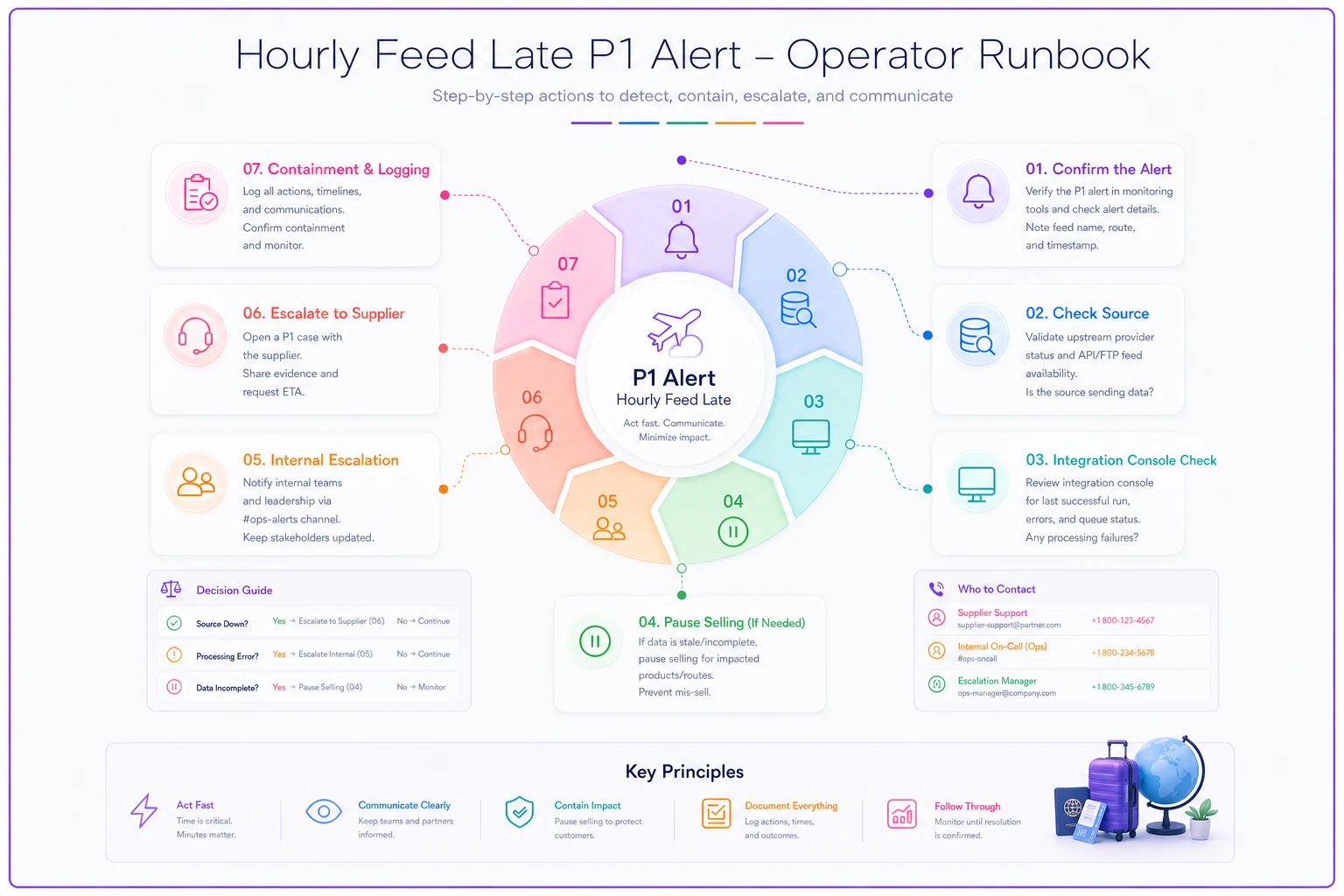
Notice step 4. Most runbooks skip straight to "escalate to the developer." But the single highest-value move a non-dev can make is stopping the sale of bad data while the technical fix happens. Containment first, fix second. An agent who pauses a supplier in two clicks has prevented more damage than one who spent 20 minutes trying to read logs.
SLA → escalation mapping
An SLA nobody escalates against is a wish. The mapping below says exactly when a human picks up a phone.
| Priority | Who's notified first | Channel | If no response in | Then |
|---|---|---|---|---|
| P0 | Technical owner + business owner | Phone call | 15 min | Call agency owner, pause supplier |
| P1 | Technical owner | Slack + phone | 30 min | Escalate to business owner |
| P2 | On-call ops | Slack | 2 hours | Convert to P1 if still open |
| P3 | Logged only | Ticket queue | Next business day | Review in weekly feed check |
The number that matters most here is the "if no response in" column. A P1 that sits unacknowledged in Slack for three hours isn't a P1 anymore — it's an outage you discovered from a client complaint. The escalation timer forces the problem to climb.
Alert and escalation templates (copy-paste, fill the blanks)
Under pressure, people write bad alerts — vague, missing the one detail the responder needs. Pre-written templates fix that. Blanks only.
Slack internal alert (P1):
> 🔴 P1 — Feed late | Supplier: [name] | Last good pull: [time] | Expected interval: [x min] | Now [x]× late | Source status page: [OK / outage] | Containment taken: [paused selling / none] | Owner needed: @[technical owner]
Phone script (P0, read it out): > "P0 feed incident. [Supplier] feed has returned [x]% validation failures since [time]. It's a high-revenue supplier. I've [paused selling / not yet]. I need you to [specific ask]. Can you look now?"
Supplier escalation email: > Subject: [URGENT] Feed outage — [your agency] — ref [incident ID] > > Hi [supplier contact], > Our [feed name] integration has had no successful data since [time] ([x] hours). Last successful pull returned [record count] records; we're now seeing [symptom]. Per our SLA ([restore window]), please confirm receipt and expected restoration time. Incident ref: [ID]. I'm reachable at [phone] until this is resolved.
The detail that separates a useful supplier email from an ignored one is the last successful record count and timestamp. Suppliers get "it's broken" emails constantly. "Last good pull 11:04, 4,900 records, now returning 180" gets their engineer to the right place in minutes.
Event-pattern operator playbook
Feeds that use events (webhooks, message queues) fail differently from scheduled pulls. The three patterns that actually recur:
-
Missed events. You expected a booking-confirmation event and it never arrived. Symptom: your records and the supplier's don't match for a specific booking. Operator action: request a targeted replay for that time window, never a full replay unless instructed.
-
Replay requests. When you ask a supplier (or your own system) to re-send events, you must verify dedupe is on first (see below), or you double-book. Replay without dedupe is how one agency created 40 duplicate reservations in an afternoon.
-
Dedupe checks. Before any replay
confirm the system drops events it has already processed. The operator check is simple — pick one known event ID, search whether it already exists in the destination table/sheet. If replaying would re-insert it, stop and escalate.
The pattern to internalize: replay is a loaded tool. It fixes missing data beautifully and creates duplicate chaos just as beautifully. The dedupe check is the safety on that tool. Never pull the trigger without it.
Small SQL and Excel reconciliation recipes
These are the checks an operator runs to answer "did this feed actually deliver what it should have?" — no developer required.
SQL: count today's records vs. the Feed Profile range
``sql
SELECT COUNT(*) AS todaysskus
FROM hotelrates
WHERE source = 'meridian'
AND pulldate = CURRENTDATE;
``
Compare the result to the expected range on the Feed Profile. Below range → investigate.
SQL: find the SKU delta vs. yesterday
``sql
SELECT
(SELECT COUNT() FROM hotelrates WHERE source='meridian' AND pulldate=CURRENTDATE) AS today,
(SELECT COUNT() FROM hotelrates WHERE source='meridian' AND pulldate=CURRENTDATE-1) AS yesterday;
``
If today is <70% of yesterday, that's your >30% delta trigger — business review.
Excel version (for Sheets/spreadsheet feeds):
-
Column A
SKU ID from today's pull. Column B: SKU ID from yesterday.
-
=COUNTA(AA) and
=COUNTA(B:B)→ compare counts. -
=COUNTIF(BB, A2) dragged down → flags which of today's SKUs existed yesterday. The blanks are brand-new SKUs; a flood of them is as suspicious as a drop.
Keep these in a saved "Feed Checks" sheet with the supplier name hard-coded. The goal is that an operator opens the sheet, pastes two pulls, and gets a yes/no answer in under five minutes.
Replay / rollback safety checklist and authorization flow
Replay and rollback are the two actions that can turn a small feed problem into a data-integrity incident. They need a gate.
-
[ ] Dedupe confirmed active (tested with one known event ID)
-
[ ] Scope defined (exact time window, exact supplier — never "everything")
-
[ ] Current state backed up / exportable before the change
-
[ ] Business owner informed if high-revenue supplier
-
[ ] Authorization obtained (see flow below)
-
[ ] Rollback-of-the-rollback understood (how to undo if this makes it worse)
Authorization flow:
-
Operator identifies replay/rollback is needed → documents scope in the incident thread.
-
For low-tier, narrow-window replays → on-call ops lead approves.
-
For high-tier suppliers or any rollback touching confirmed bookings → business owner and technical owner must both approve, in writing, in the thread.
-
Execute. Then re-run the reconciliation recipe above to confirm counts are sane.
The mistake that keeps happening: someone does a "quick replay to fix it" without defining scope, and re-sends a week of events instead of an hour. Scope and authorization exist precisely to slow down the person who's stressed and trying to be helpful.
The symptom → fix decision tree
When something's wrong and the operator doesn't know which runbook to open, this is the map. Follow it top to bottom.
-
1. Is any data arriving at all? - No → Lateness runbook (P1/P0). Contain: pause selling. Escalate per SLA. - Yes → go to 2.
-
2. Is the data valid? (run the validation check) - >5% failing → Validation runbook. High tier = P0. Contain: pause selling that supplier. - <5% failing → go to 3.
-
3. Is the data complete? (run the SKU delta recipe) - >30% delta → immediate business review. Do NOT auto-replay. A human decides. - Normal delta → go to 4.
-
4. Is a specific record missing/wrong? (event pattern) - Yes → targeted replay, after dedupe check and authorization. - No → likely a false alarm. Log it and close.
The spine of this tree is containment before fix, always. At every "something's wrong" branch, the first move pauses the bleeding — stop selling the bad inventory — and only then does anyone attempt a repair. Agencies that invert this — fix first, contain later — are the ones that end up refunding clients.
The one-page post-incident report
Keep it to one page, write it within 24 hours, and never skip it. The report isn't paperwork — it's how your thresholds get smarter over time.
> Feed Incident Report > - Date / duration: 2026-05-18, 11:04–13:40 (2h 36m) > - Supplier / feed: Meridian — rate & availability > - Severity: P1 > - Detected by: Lateness alert (1.5× trigger) at 12:34 > - Symptom: Feed silent after 11:04; no scheduler attempt logged > - Root cause: Expired API credential on our side > - Client impact: 2 quotes sent on stale rates; both re-confirmed, no deposits lost > - Containment: Supplier set to manual-confirm at 12:40 > - Fix: Credential rotated, feed restored 13:40 > - Follow-up: Add credential-expiry reminder 14 days out → owner Priya, due 2026-05-25
The field that earns its keep is "Detected by." If detection consistently happens via client complaint instead of an alert, your thresholds are too loose — and that pattern only shows up when you write it down every time.
A real scenario: the quiet 40% drop
A mid-size leisure agency running roughly 300–350 hotel bookings a month had a feed from a key supplier that normally returned around 4,900 SKUs an hour. One morning it started returning around 2,800 — valid data, no errors, just 40% fewer hotels. Because nothing failed, nothing alerted. Agents kept selling from a catalog that had silently lost two-fifths of its inventory.
By the time a client flagged a "hotel not found" at confirmation, the agency had quoted eight itineraries off incomplete data and had to walk back three. Rough cost in refunded deposits, goodwill credits, and staff rework landed somewhere in the $2,000–$3,000 range for a single morning — plus two clients who didn't rebook.
After they added one thing — the >30% SKU delta → business review trigger, wired to the simple count query above — the same drop a few weeks later threw an alert within the hour. An operator paused the supplier, emailed them the "last good pull: 4,900, now 2,800" escalation, and the supplier confirmed they'd accidentally de-listed a region. Zero bad quotes went out. The whole response took under 40 minutes and never touched a developer.
That's the entire point of this toolkit. The difference between a $3k morning and a 40-minute non-event wasn't better engineering. It was one threshold, one query, and one operator who knew exactly which runbook to open.
Who this toolkit is for — and who it isn't
This makes sense when you depend on two or more live supplier feeds, your front-desk team outnumbers your technical staff, and feed problems currently get discovered by clients instead of systems. That's the majority of small and mid-size agencies.
This is overkill when you have a single, rock-solid native integration with built-in monitoring and your volume is low enough that a human eyeballs every booking anyway. Don't build escalation timers for a feed nobody relies on.
Be careful about one failure mode: a toolkit that's never drilled is just a PDF. The thresholds, templates, and runbooks only work if an operator has run the SQL recipe at least once calmly, before the stressful day. Walk a new hire through the decision tree in their first week, pause a low-tier supplier on purpose, and watch them recover. The muscle memory is the product — the documents just make it repeatable.
Fill in one Feed Profile this week. Pick your single most revenue-critical supplier, set the three thresholds, and write the late-feed runbook for it. One supplier, done properly, beats a binder covering ten suppliers that nobody has ever actually used.
Ready to elevate your travel agency workflow?
Join 1,200+ travel agencies using Travexly to save time, improve client satisfaction, and boost operational efficiency.