

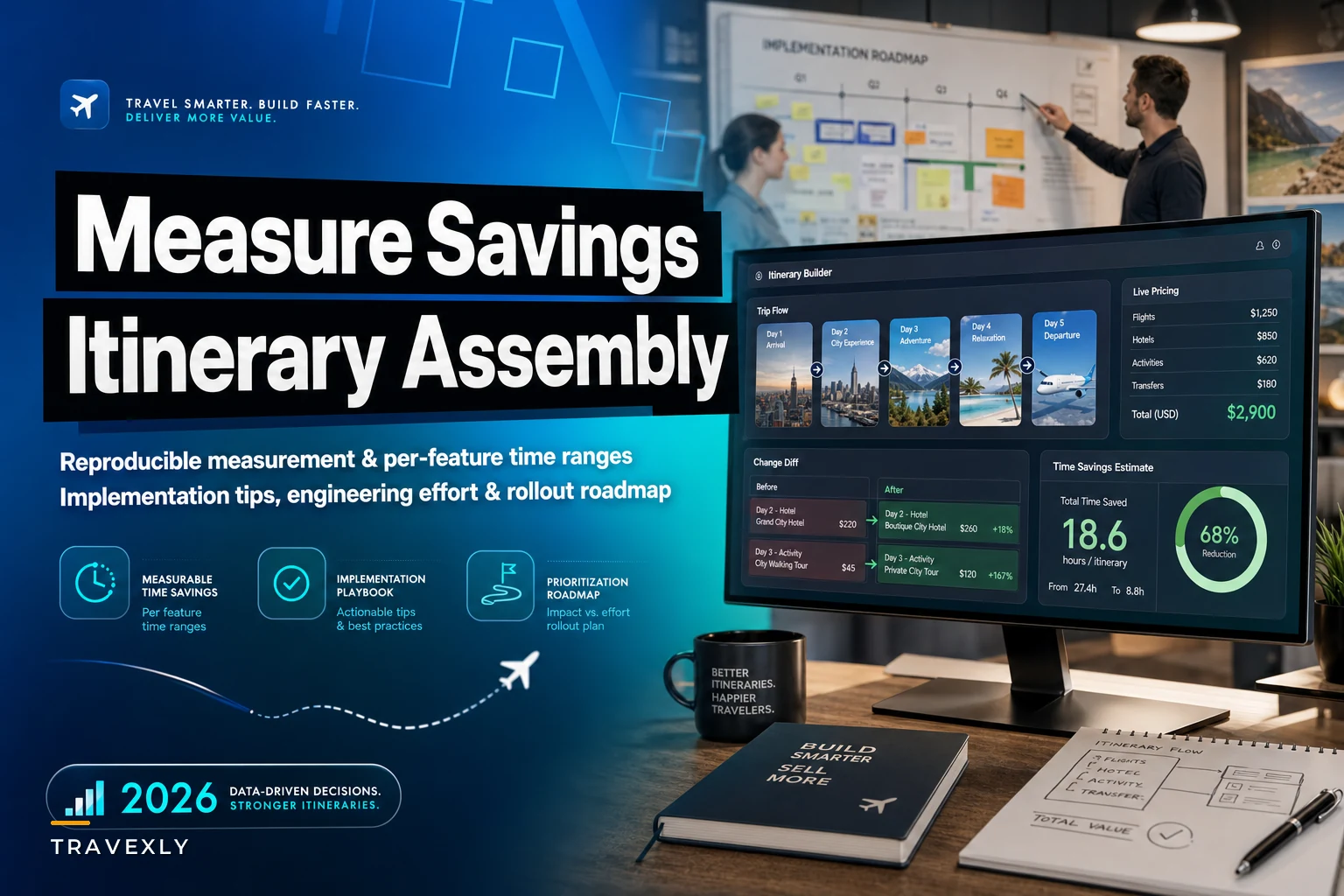

Most teams building itinerary tooling make the same planning mistake: they treat every feature as roughly equal in value, then build the shiny ones first. Drag-and-drop canvases get prioritized because they demo well. Change-tracking gets pushed to "phase 3" because it's unglamorous. Six months later, advisors are still copy-pasting supplier confirmations into a Google Doc and the canvas sits half-used.
Nobody quantifies up front where the minutes actually go. If you don't break itinerary assembly into its real sub-tasks and measure each one, you end up optimizing the parts that feel slow instead of the parts that actually are slow. Those are rarely the same thing.
This is a practical guide to putting numbers on itinerary assembly time savings — per feature, split by trip complexity — so product and engineering can argue about priorities with data instead of gut feel. We covered the foundational case for modular templating in an earlier piece on cutting itinerary assembly time with modular blocks and live price feeds; this one goes deeper into measurement, feature interactions, and how to sequence the build.
First, break assembly into measurable sub-tasks
You can't attribute savings to a feature if "itinerary assembly" is one giant blob in your planning model. In real operations, assembly breaks down into roughly six distinct activities, and advisors switch between them constantly:
-
Sourcing — finding flights, hotels, transfers, activities, and getting prices.
-
Composing — arranging those pieces into a day-by-day structure.
-
Pricing & margin — adding markup, converting currency, reconciling supplier net rates.
-
Formatting — making it look presentable for the client.
-
Revision — handling the "can we move the Tuesday tour?" rounds.
-
Confirmation — holding inventory, locking rates, converting to a booking.
When you instrument a real workflow, the time distribution almost never matches intuition. A typical mid-complexity trip — say a 7-night multi-city Europe booking — tends to break down something like this:
| Sub-task | Share of assembly time | Where advisors feel pain |
|---|---|---|
| Sourcing | ~30–35% | Price shopping, availability checks |
| Composing | ~15% | Getting the day flow right |
| Pricing & margin | ~15–20% | Manual markup, FX, net-rate math |
| Formatting | ~10–15% | Making the doc look good |
| Revision | ~15–20% | Back-and-forth with client |
| Confirmation | ~5–10% | Holds expiring, re-checking prices |
Notice that formatting — the thing drag-and-drop canvases mostly improve — is often only 10–15% of total time. That's your first prioritization clue. A gorgeous canvas can only ever claw back a fraction of a fraction. Sourcing and revision, the two biggest buckets, are where the real time lives, and they're the least visually obvious.
Feature-by-feature: what each one realistically saves
Modular blocks (reusable day/segment templates)
Eliminate booking chaos and streamline operations.
Travexly helps you manage, confirm, and track travel bookings effortlessly.
- Unified booking management
- Automated client communications
- Team scheduling & itinerary tracking
No credit card required
Saves: composing and formatting time, mostly.
Realistic range: 20–40% off composing, which translates to roughly 8–15% of total assembly time for repeat-destination trips. For a bespoke first-time-destination trip, the saving collapses to near zero — there's no reusable block to pull.
The pattern worth watching: modular blocks shine at agencies with a concentrated destination mix. If 60% of your trips touch the same 8 destinations, blocks are huge. If you're a true bespoke shop where every trip is genuinely novel, you'll build a block library nobody reuses.
Engineering effort: medium. The data model — blocks, versioning, variables like pax count and dates — is the hard part, not the UI. Budget 3–6 engineer-weeks for a solid first version, more if blocks need to carry live pricing.
Live price feeds & holds
Saves: sourcing time and — this is the underrated part — revision and confirmation time.
Realistic range: 15–30% off sourcing. But the bigger quiet win is eliminating the "price changed since I quoted it" rework loop, which can silently eat 10–20 minutes per complex trip when it hits.
The mistake teams make: they build the price feed but skip holds. A live price you can't lock is only half useful — the advisor still races the clock to confirm before the rate moves. Holds are what convert a nice-to-have feed into actual time savings.
Engineering effort: high and ongoing. Each supplier integration is its own project, feeds break, and reconciliation is never finished. This is the highest-maintenance item on the list. Don't underestimate the ops burden after launch.
Linked supplier segments
Saves: revision and confirmation time by keeping dependent pieces in sync.
Realistic range: small on simple trips, large on multi-provider ones. When a flight shifts and the linked transfer and first-night hotel auto-flag as needing adjustment, you avoid the classic silent mismatch that turns into a day-of disaster.
This feature's value is almost entirely concentrated in complex and group trips. On a simple flight-plus-hotel package it does nearly nothing.
Engineering effort: medium-high. The dependency graph logic is fiddly, and you'll spend real time deciding what "linked" actually means — hard dependency versus soft warning.
Change-tracking & visual diffs
Saves: revision time and, less obviously, trust/communication overhead.
Realistic range: 10–25% off revision cycles on trips with heavy back-and-forth. For a simple trip with one revision, it's negligible.
There's a non-time benefit that still matters operationally: visual diffs cut the "wait, did you add the extra night or not?" client confusion that generates extra emails. Those emails don't show up in your assembly timer but they absolutely cost advisor hours.
Engineering effort: medium. If you already version itineraries properly, diffing is largely a presentation problem. If you don't version, this feature forces you to — which is good anyway.
Drag-and-drop canvas
Saves: composing and formatting time.
Realistic range: 10–20% off composing for visually-oriented advisors; close to zero for advisors who think in lists and find the canvas slower than typing.
This is probably the most over-prioritized feature in the category. It demos beautifully, but its actual time impact is modest and highly advisor-dependent. Some of your best advisors will never touch it.
Engineering effort: high for a good one. Drag-and-drop that actually feels smooth — snapping, reflow, undo, mobile behavior — is deceptively expensive to build. Budget generously or build a lean version and see if anyone uses it before going further.
Preview / confirmation UIs
Saves: formatting and confirmation time, plus error-catching.
Realistic range: 5–15% off formatting, but the real value is error reduction — catching the wrong date or a double-booked night before it reaches the client.
Engineering effort: low-to-medium. Often the best ROI on the whole list because it's relatively cheap to build and prevents expensive mistakes.
Feature interactions and diminishing returns
Features don't stack linearly. This is what prioritization spreadsheets usually miss.
-
Modular blocks + live price feeds are multiplicative. A block that carries live pricing saves sourcing and composing in one motion. This combo is where the headline numbers come from — and it's the pairing most worth building together.
-
Live feeds + holds + linked segments reinforce each other on complex trips. Holds are more valuable when segments are linked because you're protecting an interdependent set, not a lone line item.
-
Drag-and-drop + modular blocks partly overlap. Both attack composing time. Build both and the second one's marginal saving shrinks — you're splitting the same 15% bucket two ways.
-
Change-tracking + preview UI overlap on the error-catching benefit.
The practical rule: once you've addressed a sub-task's time bucket with one feature, the next feature targeting the same bucket has sharply diminishing returns. Map features to sub-task buckets, not to each other, and you'll stop double-paying for the same saved minutes.
Here's a rough picture of where each feature intervenes in the assembly chain:
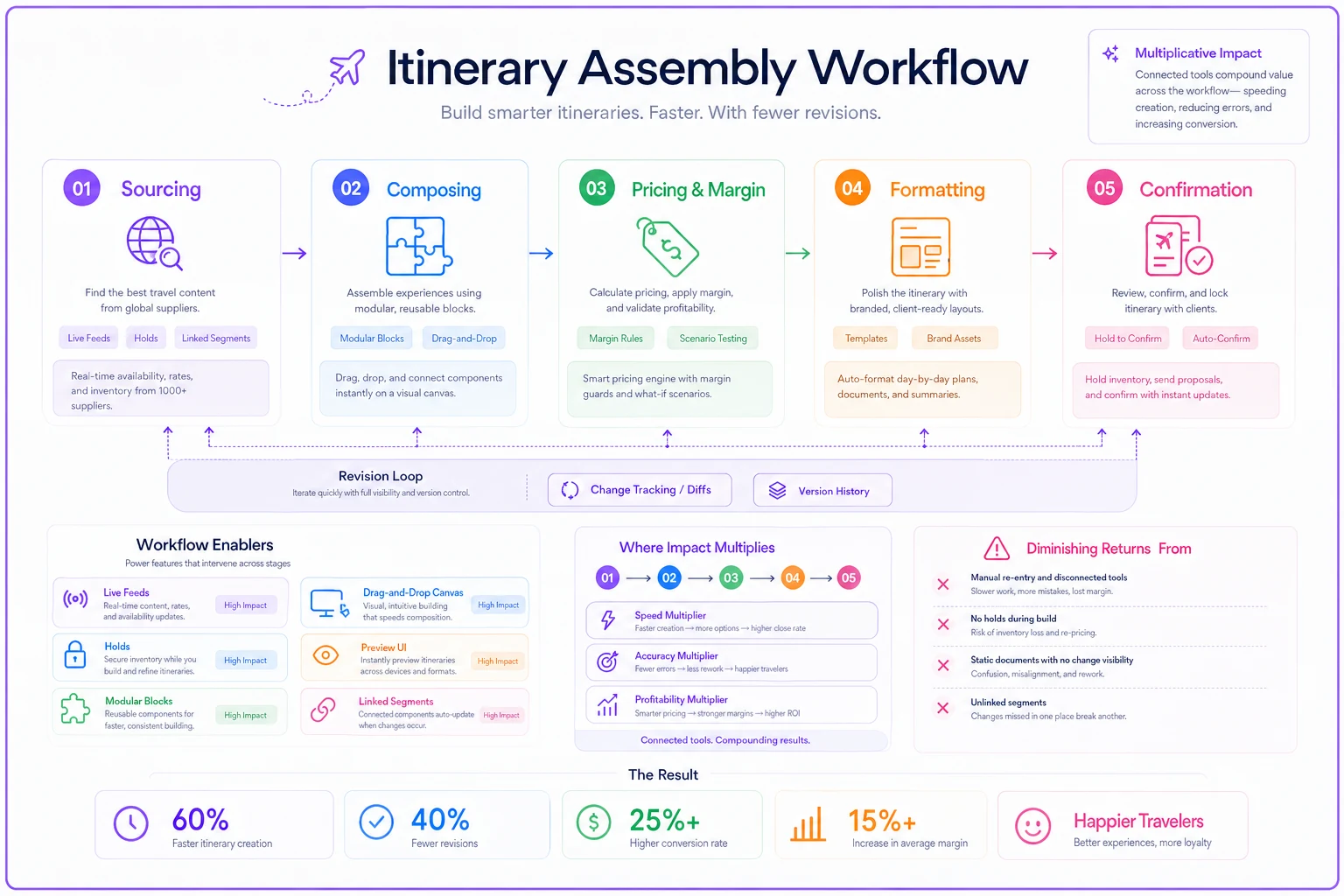
Placing features on that chain makes it obvious which ones touch multiple stages — and which ones are fighting over the same narrow slice of time.
Split-by-complexity benchmarks
Trip complexity is the single biggest factor in feature value. Here's how priorities shift across different trip types. Treat these as planning benchmarks, not promises.
| Feature | Simple (flight+hotel) | Mid (multi-city, 5–9 nights) | Complex (multi-provider, custom) | Group |
|---|---|---|---|---|
| Modular blocks | High | High | Medium | Medium |
| Live price feeds + holds | Medium | High | High | High |
| Linked segments | Low | Medium | High | Very high |
| Change-tracking/diffs | Low | Medium | High | Very high |
| Drag-and-drop | Low | Medium | Medium | Low |
| Preview/confirmation | Medium | Medium | High | Very high |
Read it this way: if your book of business is mostly simple trips, modular blocks + preview UI gets you most of the available savings cheaply, and you can skip linked segments entirely for now. If you live in complex and group trips, linked segments, change-tracking, and holds are where advisors are bleeding time — and a canvas is a distraction.
Understanding how these features relate to the assembly chain matters more than it might seem. Sourcing feeds into composing, composing feeds into pricing, and pricing gates formatting — with revision looping back to any of the first three. Features that sit early in that chain have compounding effects downstream. Features that only touch the tail end don't.
A real scenario with numbers
A mid-sized leisure agency — eight advisors, roughly 190–220 itineraries a month, mostly mid-complexity Europe with a chunk of group trips — timestamped their workflow for three weeks before building anything.
Baseline: average mid-complexity trip took about 95 minutes of active assembly, with revision cycles adding another 25–40 minutes when a client pushed back, which was most of the time.
They sequenced deliberately: preview/confirmation UI first (cheap), then modular blocks for their top destinations, then change-tracking and diffs, and finally live price feeds for their two highest-volume suppliers. They deliberately skipped the drag-and-drop canvas despite the team wanting it.
After roughly four months, average mid-complexity assembly dropped to around 62–68 minutes, and the revision loop shrank noticeably because clients could see exactly what changed instead of re-reading the whole document. The group-trip advisors said change-tracking was the single feature they'd fight to keep — not the one anyone predicted.
Rough math: ~30 minutes saved across ~200 trips is something like 90–100 advisor-hours a month returned. The interesting footnote is that most of the saving came from the cheap features — preview, blocks, and diffs — not the expensive price-feed integration, which mostly paid off on confirmation reliability rather than raw minutes saved.
How to A/B test this properly
If you can, don't just ship and eyeball the results. A clean test design matters:
-
Randomize at the advisor level, not the trip level. Trips vary too much; advisors are the stable unit. Split your team into treatment (new feature) and control.
-
Match on trip complexity. Compare simple-to-simple, complex-to-complex. Mixing complexity levels drowns your signal in noise.
-
Measure active assembly minutes and revision cycles separately. A feature can cut composing while leaving revision untouched — you want to see which.
-
Run for enough volume, not enough calendar time. Aim for at least 40–50 trips per arm per complexity tier before trusting the difference.
-
Track a quality guardrail. Error rate (wrong dates, mismatched segments) and client revision requests. A feature that saves minutes but raises errors is a net loss.
If your volume is too low for clean A/B tests — common for small agencies — do a before/after with the same advisors and accept it's directional. Just hold the trip mix roughly constant across the two periods.
When each feature is a bad idea
Not every feature belongs in every roadmap. A few patterns worth calling out explicitly:
-
Drag-and-drop canvas is a bad investment if your advisors are list-thinkers or your trips are simple. High engineering cost for a feature half the team ignores.
-
Linked segments are overkill for a flight-and-hotel package shop. The dependency logic won't return anything meaningful.
-
Full live price feeds are a bad first build. They're the highest-maintenance item on the list, and the savings depend on everything around them already existing. Start with one or two suppliers, prove the value, then expand.
-
Modular blocks are a waste for a true bespoke luxury shop where no two trips repeat. You'll build a library nobody reuses.
Start with one or two suppliers, prove the value, then expand.
Prioritized rollout checklist by business model and volume
Use this as a starting sequence, then adjust to your measured sub-task distribution.
High-volume, simple/mid trips (OTA-style, package-heavy):
-
[ ] Preview/confirmation UI (cheap, catches errors at volume)
-
[ ] Modular blocks for top 10 destinations
-
[ ] Live price feeds + holds for your 1–2 biggest suppliers
-
[ ] Change-tracking (only if revision volume is high)
-
[ ] Drag-and-drop — skip or defer
Bespoke/complex leisure:
-
[ ] Linked supplier segments
-
[ ] Change-tracking / visual diffs
-
[ ] Preview/confirmation UI
-
[ ] Live feeds + holds for key suppliers
-
[ ] Modular blocks only for recurring destinations
Group-heavy:
-
[ ] Change-tracking / visual diffs (first — this is where group pain concentrates)
-
[ ] Linked segments
-
[ ] Preview/confirmation UI with per-traveler views
-
[ ] Holds (group inventory moves fast)
-
[ ] Modular blocks for repeated group formats
Low-volume, any mix:
-
[ ] Preview/confirmation UI
-
[ ] Modular blocks
-
[ ] Skip A/B testing; do before/after
-
[ ] Defer expensive integrations until volume justifies the maintenance burden
Use this as a starting sequence, then adjust to your measured sub-task distribution.
Closing thought
Itinerary tooling gets mis-prioritized for a predictable reason: the expensive, demo-friendly features — canvases, full price-feed integrations — aren't where most advisor minutes actually hide. The boring stuff tends to return more time per engineering dollar, especially before you've instrumented anything. A solid preview screen, reusable blocks for your actual destination mix, a visible diff when something changes — these rarely make it into product demos but they show up clearly in advisor hour counts.
Measure first. Break assembly into its six sub-tasks, time them for two weeks, and let the actual distribution decide your roadmap. You'll almost certainly find the biggest bucket isn't the one your team has been itching to build.
Itinerary tooling gets mis-prioritized for a predictable reason: the expensive, demo-friendly features — canvases, full price-feed integrations — aren't where most advisor minutes actually hide. The boring stuff tends to return more time per engineering dollar, especially before you've instrumented anything. A solid preview screen, reusable blocks for your actual destination mix, a visible diff when something changes — these rarely make it into product demos but they show up clearly in advisor hour counts.
Measure first. Break assembly into its six sub-tasks, time them for two weeks, and let the actual distribution decide your roadmap. You'll almost certainly find the biggest bucket isn't the one your team has been itching to build.
Ready to elevate your travel agency workflow?
Join 1,200+ travel agencies using Travexly to save time, improve client satisfaction, and boost operational efficiency.