


Running a travel agency means you're sitting on a goldmine of personal data. Passport numbers, credit cards, birthdays, travel histories—everything a criminal needs to ruin someone's vacation and your business in one move. Most agencies store this stuff in surprisingly casual ways. Excel sheets on desktop computers. Email threads with full card numbers. Shared Google Drive folders where anyone who ever had the link can still access client passports from 2019. The scary part? These agencies genuinely believe they're being careful. Travel agency data security PCI compliance isn't just about avoiding fines—though those can hit $50,000 for a first offense. It's about not becoming the agency that had to call 200 clients to explain why their card details are now for sale on some forum. That phone call kills businesses faster than any economic downturn.
Your biggest vulnerability runs through Gmail
Every travel agency has the same weak point: email. Not hackers breaking into servers. Just regular email accounts handling sensitive data like it's a grocery list.
Think about a typical booking flow. Client emails their passport photo. You forward it to the tour operator. The operator sends it to the hotel. The hotel confirmation comes back with the booking reference. You email the client their full itinerary. Five different inboxes now have that passport image sitting there permanently.
A typical travel agent's inbox contains enough personal data to commit identity theft on a few hundred people. Credit card authorizations, passport scans, driver's licenses, home addresses, travel dates, medical conditions. All searchable, all permanent, all one compromised password away from disaster.
The email chain multiplier effect
When Sarah from accounting needs a client's card to process a refund, she emails you. You forward the original booking email—which includes the full card number because that's how the client sent it three months ago. Sarah processes the refund, then forwards the confirmation to Mike in customer service. Mike includes it in the client's file, which gets backed up to Dropbox.
-
Your sent folder
-
Sarah's inbox
-
Mike's inbox
-
The company Dropbox
-
Three backup locations
-
Any device where someone checked email
One compromised account exposes everything. And before you think "we use strong passwords"—a majority of data breaches originate from inside the organization, usually not maliciously. Just someone's teenager using mom's laptop to download games and accidentally installing malware.
PCI compliance for agencies: simpler than you think, harder than you're doing
Travel agencies fall into a weird spot with PCI compliance. You're not technically a payment processor, but you handle card data constantly. Airlines and hotels push the compliance burden onto you without providing the tools to actually achieve it.
Eliminate booking chaos and streamline operations.
Travexly helps you manage, confirm, and track travel bookings effortlessly.
- Unified booking management
- Automated client communications
- Team scheduling & itinerary tracking
No credit card required
Real PCI basics for small agencies come down to three things:
1. Don't store what you don't need If you're keeping credit card numbers "just in case," you're creating liability without benefit. That Excel sheet with 500 client cards from the past two years? Delete it. The email folder called "Credit Card Authorizations"? Gone.
2. Encrypt what you must store Sometimes you legitimately need to keep card data temporarily. Group bookings with staggered payments. Held reservations waiting for passport renewals. Corporate accounts with recurring charges. This data needs encryption, not just password protection.
3. Limit access ruthlessly The new intern doesn't need access to payment data. Neither does your social media manager. Create separate email addresses for bookings and general inquiries. Use booking@ for sensitive stuff, info@ for everything else.
What PCI actually requires vs what auditors check
The official PCI DSS has 12 requirements and 200+ sub-requirements. Nobody expects a 5-person travel agency to implement all of them. But auditors—and lawyers after a breach—will check for the basics:
-
Are card numbers stored in plain text? (Excel, Google Sheets, notepad files)
-
Can anyone in the company access payment data?
-
Do you have any documentation of security practices?
-
When did you last delete old payment data?
-
How do you handle card data that comes in through email?
Clear those five checks and you're already ahead of the vast majority of small agencies.
The vendor security questionnaire that actually matters
Every software vendor claims to be "secure" and "PCI compliant." When you're choosing systems for your agency, you need to ask specific questions that reveal how they actually handle data—not how their marketing team describes it.
For any booking or CRM system:
-
"Show me where credit card numbers appear in your system" Bad answer
"They're encrypted" Good answer: "Only the last 4 digits ever display, full numbers are tokenized through our payment processor"
-
"What happens to email attachments with passport scans?" Bad answer
"They're stored securely" Good answer: "We strip attachments and store them in encrypted blob storage with automatic deletion after 90 days"
-
"Which staff roles can see payment data?" Bad answer
"It depends on your settings" Good answer: "Here's our role matrix—only designated payment admins can access tokenized cards, and we log every access"
-
"How do you handle data deletion requests?" Bad answer
"Email support and we'll handle it" Good answer: "Users can schedule automatic deletion, we maintain deletion logs, and provide certificates of destruction"
-
"What's your breach notification timeline?" Bad answer
"We follow industry standards" Good answer: "24 hours to affected users, 72 hours public disclosure, here's our last 3 years of security audits"
For payment processors specifically:
-
Do they provide tokenization? (replacing card numbers with random tokens)
-
Can you process payments without ever seeing the full card number?
-
Do they offer virtual terminal access that keeps card data off your systems?
-
What's their chargeback dispute process?
-
Do they provide PCI compliance certificates you can show partners?
Red flags that should end the conversation
-
"We're working on our PCI compliance"—either you are or you aren't
-
"We use military-grade encryption"—marketing fluff, not a real answer
-
"Our security is proprietary"—security through obscurity doesn't work
-
"We've never had a breach"—everyone gets breached eventually, honesty matters
-
"Small agencies don't need to worry about this"—they're setting you up for liability
Every software vendor claims to be "secure" and "PCI compliant." When you're choosing systems for your agency, you need to ask specific questions that reveal how they actually handle data—not how their marketing team describes it.
Your 90-day security improvement checklist
Start with the easiest, highest-impact fixes. Each item here can be done in under two hours and costs less than $50/month.
Week 1-2: Email cleanup
-
Create a separate email for payment processing (payments@youragency)
-
Search all inboxes for credit card numbers (search
"4111" "5555" "visa" "mastercard")
-
Delete every email containing full card numbers
-
Set up auto-deletion rules for emails older than 90 days
-
Stop accepting card numbers via email (create a secure form instead)
Week 3-4: Password and access control
-
Implement 2-factor authentication on all email accounts ($0, built into Gmail/Outlook)
-
Create unique logins for each staff member (no more shared passwords)
-
Use a password manager (1Password is around $36/year per person)
-
Change all passwords that multiple people know
-
Revoke access for former employees—check everything, email, drives, booking systems
Week 5-6: Data inventory and deletion
-
Find every place you store client data (computers, cloud drives, phones, tablets)
-
Delete client data over 18 months old unless legally required to keep it
-
Remove credit card data from all spreadsheets
-
Clear browser saved passwords and autofill data
-
Shred physical credit card authorization forms
Keep a deletion log when removing old payment data so you can prove compliance to partners or auditors.
Week 7-8: Vendor security audit
-
List every software tool that touches client data
-
Email each vendor the security questionnaire above
-
Replace any vendor that can't provide basic security documentation
-
Ensure your payment processor provides PCI compliance certificates
-
Document which systems have access to what data types
Week 9-12: Policies and training
-
Write a simple 1-page data handling policy
-
Train staff on never saving card numbers
-
Create a breach response plan (who to call, what to do)
-
Set quarterly calendar reminders to delete old data
-
Document your security practices—this proves good faith effort if something ever does go wrong
Most agencies that go through this process are surprised how much stray data they find. It's not that people were careless on purpose. It's that nobody ever set a default, so data ended up everywhere.
The "good enough" security stack for small agencies
| Category | Tools | Approx. Cost |
|---|---|---|
| Payments | Stripe, Square, or Authorize.net | Transaction fees only |
| Document storage | Google Workspace or Microsoft 365 | ~$6–22/user/month |
| Password management | 1Password, Bitwarden, or LastPass | ~$3–4/user/month |
| Client communication | JotForm/Typeform (encrypted), secure client portal | ~$25–50/month |
Total monthly cost: roughly $85–150 depending on agency size. Compare that to average breach costs of around $38,000 for small businesses.
For payments: Never touch raw card numbers. Use virtual terminals for phone orders and secure payment links for clients.
For document storage: Enable access logs, set auto-deletion policies, and keep sensitive documents in separate folders with limited access.
For passwords: Unique passwords for everything, mandatory 2-factor authentication, and regular access audits.
For client communication: Encrypted forms for data collection, secure client portals instead of email chains, and WhatsApp Business for quick updates since it's end-to-end encrypted.
When security becomes operations
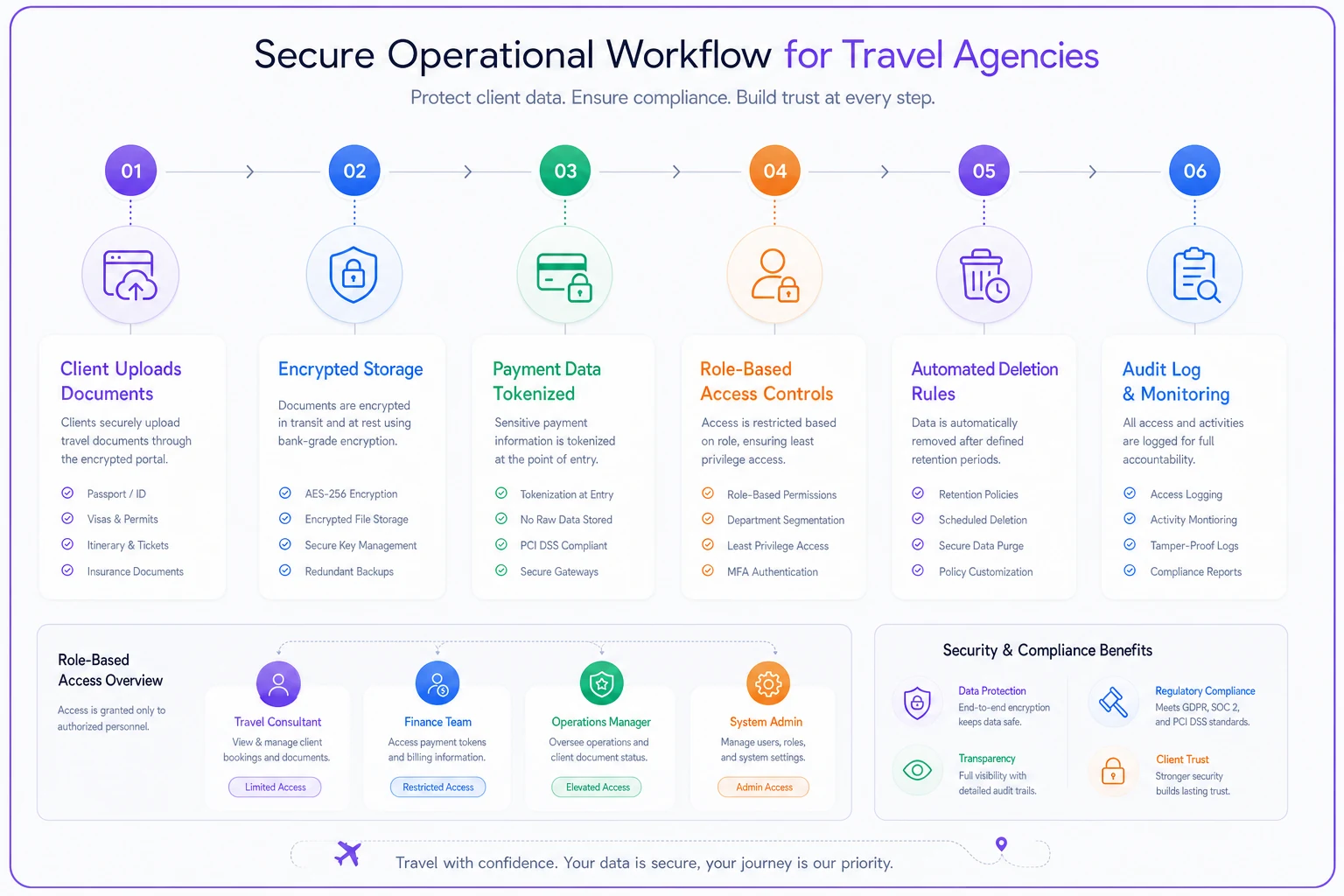
The best approach to travel agency data security PCI compliance isn't adding more tools—it's building security into your operational flow so that the secure way is also the natural way.
Instead of emailing passport scans back and forth, use a client portal where documents upload once and stay put. Rather than collecting card numbers through various channels, standardize on one secure payment flow. Security stops being a chore when it's just how things work.
Agencies that have genuinely improved their security posture usually didn't do it by buying expensive software. They did it by changing small habits. Stopping the Post-it note card numbers. Moving from email to a proper booking system. Finally deleting that infamous "CREDIT CARDS 2019-2023.xlsx" file that everyone knew about but nobody wanted to touch.
The question worth asking at your next team meeting
Ask this: "If our email got hacked today, how many clients would we need to notify?" The answer usually causes a moment of silence. Follow up with: "What would we need to change to make that number zero?"
Here's a simple workflow that shows how secure operations replace email chains and scattered spreadsheets.
That's when real improvements actually start—not because of compliance requirements, but because nobody wants to make those calls.
The security automation that pays for itself
When agencies move from spreadsheets and email chains to proper operational software, security issues tend to drop sharply—without any additional training required. The platform handles the risky stuff by default rather than relying on people to remember the right steps every single time.
AI-powered operational platforms can automatically detect and redact card numbers from communications, encrypt sensitive documents, and maintain audit logs without someone manually managing it. More importantly, they make the secure process the default, not the exception.
A well-built operational platform will:
-
Tokenize payment data immediately on entry
-
Automatically delete old client information based on retention rules
-
Maintain access logs without manual tracking
-
Flag potential security violations before they become incidents
-
Generate compliance reports for partners who require them
This isn't about buying the most expensive security solution. It's about choosing tools that build security into your workflow rather than bolting it on afterward.
Even if you're not ready to move to a full platform, the principle still applies. Whatever system you're using, set it up so the secure path requires less effort than the insecure one. That's the only way habits actually stick across a whole team.
Stop treating security like insurance
Most agencies treat security like car insurance—something you grudgingly pay for and hope to never use. But decent security practices actually make operations smoother, reduce errors, and prevent the small daily mistakes that eat up time.
When you can't accidentally email the wrong client's passport to someone, you avoid embarrassing corrections. When payment data lives in one system instead of scattered across inboxes, refunds process faster. When everyone has their own login, you know exactly who made changes and when.
Travel agency data security PCI compliance isn't about perfection. It's about being meaningfully better than the agency down the street still emailing Excel sheets full of card numbers. In a world where one breach can end your business, that bar isn't actually that hard to clear.
The agencies that get this right aren't the ones with the best security technology. They're the ones who made security so routine and automatic that nobody even thinks about it anymore. That's the goal.
Ready to elevate your travel agency workflow?
Join 1,200+ travel agencies using Travexly to save time, improve client satisfaction, and boost operational efficiency.