



Most agency owners don't have an automation problem. They have a prioritization problem. There are fifty things you could automate, and if you try to do all of them at once, you'll do none of them well. So this post skips the theory and does something more useful: it ranks five automations by two things you actually care about — hours saved per month and errors prevented — and gives you copyable formulas and Zapier setups so you can build them yourself.
Ordered by ROI, not by how flashy they sound. The boring ones at the top save the most money.
How I'm scoring these
Two axes:
-
Time saved — estimated hours per month, based on a typical 2–4 person agency doing somewhere around 40–90 bookings a month.
-
Error reduction — how often the manual version produces a mistake that costs money or a client relationship.
Here's the ranking at a glance:
| # | Automation | Est. time saved/mo | Error reduction | Build difficulty |
|---|---|---|---|---|
| 1 | Deposit/payment reminder sequence | 8–12 hrs | High | Low |
| 2 | Booking-to-sheet capture | 6–10 hrs | Very high | Low |
| 3 | Supplier deadline tracker | 4–7 hrs | Very high | Medium |
| 4 | Post-inquiry auto-response + routing | 5–8 hrs | Medium | Low |
| 5 | Document expiry alerts (passport/visa) | 2–4 hrs | High (per incident) | Medium |
Notice number five saves the least time but prevents the most catastrophic single failures. Time saved isn't everything — a missed passport-expiry check can nuke an entire trip. Keep that tension in mind as you work through the list.
1. Automated deposit and payment reminders
This is the highest-ROI automation for most agencies, and it's almost embarrassingly simple to build.
Eliminate booking chaos and streamline operations.
Travexly helps you manage, confirm, and track travel bookings effortlessly.
- Unified booking management
- Automated client communications
- Team scheduling & itinerary tracking
No credit card required
The problem: Someone on your team is manually checking who paid, who owes, and who's overdue — then writing individual "just a friendly reminder" emails. On a 60-booking month with staged payments, that's easily 8–12 hours of someone's time. And it's error-prone. People forget. Clients slip through. A deposit due date passes and nobody notices until the supplier releases the space.
Why it happens: Payment schedules live in someone's head or scattered across email threads. There's no single trigger firing when a date gets close.
The fix: Put every booking's payment dates in a Google Sheet, then let Zapier watch the dates and fire reminders automatically.
Your sheet needs these columns at minimum:
-
Client Name -
Client Email -
Deposit Due -
Deposit Paid(checkbox or Yes/No) -
Balance Due -
Balance Paid
A formula to flag what needs a reminder. Drop this in a helper column:
=IF(AND(A2<>"", D2="No", C2-TODAY()<=3, C2-TODAY()>=0), "SEND REMINDER", "")
Where C2 is the deposit due date and D2 is the paid status. This flags anything due within 3 days that hasn't been paid.
-
Trigger Schedule by Zapier — runs daily at 8am.
-
Action Google Sheets → Lookup Rows (find rows where the helper column = "SEND REMINDER").
-
Action Loop through those rows.
-
Action Gmail/Outlook → Send Email using the client's email and a template with merge fields.
For balance reminders, duplicate the logic pointing at Balance Due.
ROI in real numbers: An agency doing roughly 55 bookings a month was spending about 10 hours on payment chasing and losing a booking or two per quarter to missed deposit deadlines. After the sheet-plus-Zapier setup, chasing dropped to under 2 hours (just handling replies), and the missed-deadline problem basically went away. At even a modest $400 margin per lost booking, that's a couple thousand dollars a quarter recovered — from a Saturday afternoon of setup.
When this is a bad idea: If your payment terms are wildly custom on every deal, the reminder templates get messy fast. But most agencies run 3–4 standard schedules. Standardize first, automate second.
2. Booking-to-sheet capture (kill the double entry)
The problem: A booking gets confirmed in email or over the phone, and then someone manually retypes the details into a spreadsheet, the CRM, the accounting doc, and a shared calendar. Four systems. Same data. Typed four times. Every retype is a chance to fat-finger a date, misspell a name on a ticket, or transpose a confirmation number.
Name typos on tickets aren't a minor annoyance. Airlines are strict, and a mismatched name can mean a reissue fee or a denied boarding at the gate — which becomes your problem and your reputation.
Why it happens: No single source of truth. Data enters through inconsistent channels and gets copied outward by hand.
The fix: Capture the booking once, at the source, and let it flow automatically. The cleanest entry point is a structured form.
Workflow:
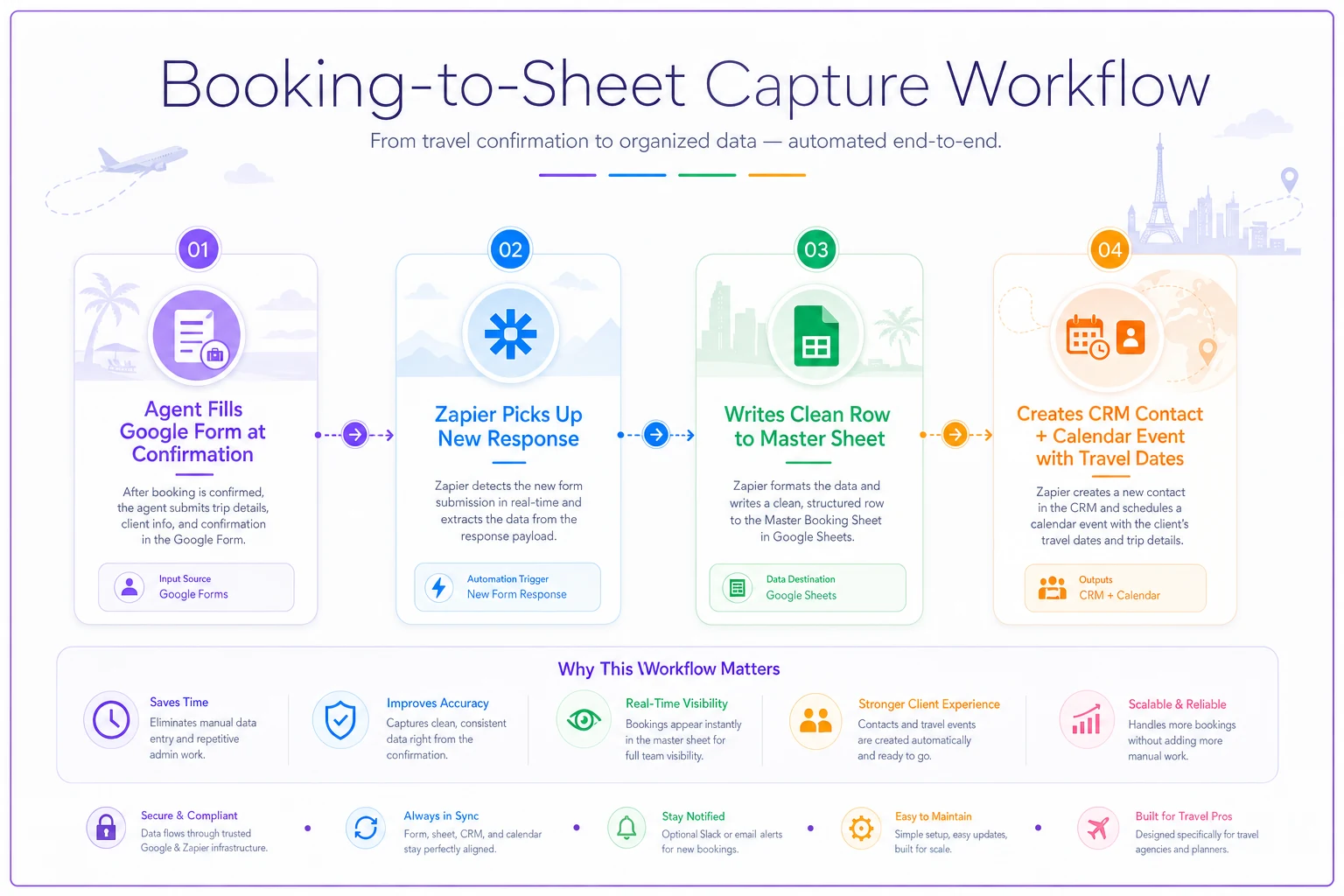
One thing people consistently skip: validation at the form level. Force date fields to be actual dates, force the confirmation number to match a pattern. Garbage in still means garbage out, automation or not.
Force validation at the form level to avoid garbage in, garbage out.
-
Trigger Google Forms → New Response (or Typeform/JotForm).
-
Action Google Sheets → Create Spreadsheet Row.
-
Action Your CRM → Create/Update Contact.
-
Action Google Calendar → Create Detailed Event (departure and return).
A cleanup formula to catch obvious name issues before they reach a ticket:
=IF(REGEXMATCH(B2, "[0-9]"), "CHECK NAME - contains number", "")
Small, but it catches the "Room 204 Smith" paste error more often than you'd expect.
ROI: Double entry across four systems for around 50 bookings runs 6–10 hours monthly and is the single biggest source of downstream data errors. Removing it doesn't just save time — it cuts the root cause of a whole category of mistakes. That's why its error-reduction score is "very high."
3. Supplier deadline tracker
The problem: Every supplier has its own rules — final payment dates, name-change cutoffs, free-cancellation windows, rooming-list deadlines. Miss one and you eat a penalty or lose the space. Tracking these across a dozen suppliers from memory is how agencies quietly bleed money over time.
Why it happens: Deadlines vary per supplier and per booking, and there's no unified view. Each one lives buried in a different confirmation email.
The fix: A single "deadlines" sheet with tiered alerts, so you get warned at 7 days, 3 days, and 1 day before any cutoff.
Structure your sheet with a Deadline Date and Deadline Type column, then a status formula:
=IFS(
  C2-TODAY()<0, "PASSED",
  C2-TODAY()=0, "DUE TODAY",
  C2-TODAY()<=1, "1 DAY",
  C2-TODAY()<=3, "3 DAYS",
  C2-TODAY()<=7, "7 DAYS",
  TRUE, "ok"
)
-
Trigger Schedule by Zapier — daily.
-
Action Google Sheets → Lookup Rows where status ≠ "ok".
-
Action Filter — only continue if matches found.
-
Action Slack → Send Channel Message listing the client, supplier, and deadline type.
The tiered warning is what makes this actually useful. A single "due today" alert is too late if the supplier needs 48 hours to process a payment. The 7-day heads-up is what actually saves you.
When this makes sense: Once you're working with more than three or four suppliers who all have different terms. Below that, calendar reminders might be enough. Above it, you will miss something eventually — it's just a matter of when.
4. Post-inquiry auto-response and routing
The problem: Inquiries come in through the website, email, Instagram, referrals — and response time is all over the place. Some get answered in ten minutes, some sit for two days because they landed in the wrong inbox. In travel, the agency that responds first often wins the booking. Slow first responses cost you deals you never even knew you were competing for.
Why it happens: Multiple intake channels, no central routing. Whoever happens to check that inbox responds; nobody owns it systematically.
The fix: Auto-acknowledge every inquiry within seconds and route it to the right agent based on trip type.
-
Trigger New inquiry (email parser, form, or webhook from your site).
-
Action Send Email — instant acknowledgment with expected response time and a link to your intake questionnaire.
-
Action (Paths) Route by keyword or form field — - "corporate" / "group" → senior agent - "honeymoon" / "luxury" → specialist - everything else → round-robin to available agents
-
Action Log the inquiry to a Sheet with a timestamp for response-time tracking.
That acknowledgment email does double duty: it buys you time and starts qualifying the lead. If you point it at a structured intake questionnaire, you shorten the back-and-forth before anyone even picks up the thread.
One caution worth mentioning: don't over-automate the actual reply. Auto-acknowledgment is great. Auto-sending a full quote from a bot is where clients start to feel processed rather than served. Automation handles the speed and routing; a human handles the relationship.
ROI: Faster, consistent first responses tend to lift inquiry-to-booking conversion by a few percentage points, and clean routing eliminates the "who's handling this?" confusion that burns hours in a busy shop every month.
5. Document expiry alerts (passport and visa)
This one saves the least time per month and prevents the worst disasters. That's exactly why it's on the list.
The problem: A client shows up with a passport expiring in four months, but the destination requires six months of validity. Nobody caught it. Now you're scrambling, the client's furious, and the trip's at risk — sometimes days before departure.
Why it happens: Passport and visa checks depend on someone remembering to look at the right moment. Manual checks slip, especially on bookings made months in advance where the document was "fine" when originally booked.
The fix: Store passport expiry dates at intake, then run a validity check against departure dates automatically.
Formula to flag insufficient validity (assuming a 6-month rule):
=IF(AND(D2<>"", B2<>"", D2 < (B2+180)), "PASSPORT VALIDITY RISK", "OK")
Where D2 is passport expiry and B2 is departure date. Adjust 180 to 90 for destinations with a three-month rule.
-
Collect passport expiry at intake, not later
-
Store it in the same master sheet as the booking
-
Build a per-destination validity rule reference (6-month, 3-month, none)
-
Run the check weekly, not just at booking time
-
Route flags to a human — this needs judgment, not just an automated email to the client
Because this one touches sensitive personal data, be deliberate about where you store it and who can access it. A locked-down sheet with restricted access is the minimum bar.
A real scenario, start to finish
A three-person agency doing around 50–65 bookings a month was drowning in exactly the manual work described above. Their two worst pain points: chasing payments and re-keying booking data across systems.
Before automating, the team was spending close to 20 hours a month on payment reminders and double entry combined. They'd lost a handful of bookings over the year to missed deposit deadlines, and dealt with one name-typo reissue that cost them both a fee and a client's trust.
They built automations 1 and 2 first — highest ROI, lowest difficulty — over about two weekends. Within the first 90 days:
-
Payment chasing dropped to roughly 2–3 hours a month
-
Double entry effectively disappeared — one form entry now feeds everything
-
No missed deposit deadlines in that window
-
The owner got back most of a full working day each week to actually focus on selling
They added the supplier deadline tracker in month three once the first two were stable. Nothing fancy. No new software subscription. Just Google Sheets, Zapier, and a weekend of setup each time.
The order matters more than the tools
Build these in ROI order, one at a time, and let each one stabilize before starting the next. Agencies that try to automate everything in a single sprint usually end up with half-working Zaps nobody trusts, and they quietly go back to doing everything by hand.
Start with payment reminders. It's the fastest to build and the fastest to pay back. Get comfortable with how the pieces fit together, then move down the list. By the end of a quarter you'll have clawed back real hours in your week and closed off the most expensive mistakes — the kind that don't show up on a report until a client is standing at a gate with the wrong passport.
None of this requires an ops overhaul or a big platform migration. It requires picking one thing, building it well, and moving on to the next. Ninety days is enough time to feel the difference.
None of this requires an ops overhaul or a big platform migration. It requires picking one thing, building it well, and moving on to the next. Ninety days is enough time to feel the difference.
Ready to elevate your travel agency workflow?
Join 1,200+ travel agencies using Travexly to save time, improve client satisfaction, and boost operational efficiency.