


Every travel agency deals with supplier invoice reconciliation. Hotels send invoices that don't match your booking records. Airlines charge different amounts than quoted. Tour operators add fees you weren't expecting. Ground transportation bills arrive weeks late with vague descriptions.
The real damage happens when discrepancies slip through unnoticed. You overpay a hotel by $400 because their invoice included a cancelled room. You miss a commission credit from a tour operator because the booking reference was wrong. Your accounting shows different numbers than your booking system, and suddenly you're spending entire afternoons trying to figure out where the money went.
Most agencies handle this with spreadsheets and manual checking. Someone exports bookings, someone else downloads invoices, and then comes the painful process of matching everything line by line. It works until it doesn't—usually right when you're trying to close the books or explain to a client why their card was charged twice.
Why supplier invoice reconciliation breaks down in travel agencies
Travel bookings create uniquely messy reconciliation challenges. A single trip might involve eight different suppliers, each with their own invoice format, payment terms, and booking references. The hotel uses confirmation numbers, the airline uses PNRs, the transfer company uses your agency reference, and the tour operator uses their internal booking ID.
Multiply that by 50 bookings per month. That's potentially 400 different invoice line items to match against your records. Each one needs checking for:
-
Correct dates and passenger names
-
Accurate room types or flight classes
-
Applied commissions and markups
-
Cancellation or modification fees
-
Currency conversions if booking internationally
-
Net rates versus commissionable rates
The process typically looks like this: invoices arrive throughout the month via email, some as PDFs, others embedded in the email body. Your ops person saves them to a folder (hopefully). At month-end, someone opens each invoice, finds the matching booking in your system, and manually compares every detail.
This breaks down fast. Invoices use different date formats—the European supplier shows 15/03/2024 while your system shows 03/15/2024. The client's name appears as "Smith, John" on one document and "John Smith" on another. A booking modification creates two invoice lines that need combining. Your spreadsheet shows the booking exists, but the amounts don't match, and now you're digging through email chains from three weeks ago.
Field mapping fixes the foundation
The core problem with supplier invoice reconciliation isn't the volume—it's the chaos of inconsistent data formats. Field mapping creates a translation layer between what suppliers send you and what your systems actually need.
Eliminate booking chaos and streamline operations.
Travexly helps you manage, confirm, and track travel bookings effortlessly.
- Unified booking management
- Automated client communications
- Team scheduling & itinerary tracking
No credit card required
Start with the essential fields that must match:
-
Booking reference mapping
-
Hotel confirmation → Your booking ID
-
Airline PNR → Your booking ID
-
Supplier invoice number → Your invoice tracking
-
Tour operator reference → Your booking ID
Build a master mapping table that shows how each supplier's fields correspond to yours. When Marriott sends "Confirmation: 84573928-A," your mapping table knows this equals "Booking ID: TRV-2024-0392" in your system. When Lufthansa invoices show "Booking Reference: ABC123," you've already defined that this matches your "File Number: 24-1156."
| Supplier | Their Field Name | Their Format | Our Field | Transformation Needed |
|---|---|---|---|---|
| Hilton | Conf Number | 9 digits-letter | Booking ID | Strip letter suffix |
| Delta | Record Locator | 6 characters | PNR | Direct match |
| Viator | Order Number | VTR-numbers | Tour Ref | Remove "VTR-" prefix |
| Hertz | Reservation ID | Mixed format | Rental Ref | Standardize to uppercase |
The transformation column matters more than people expect. Suppliers rarely send clean data. Hilton might include "CONF#: 123456789-B (MODIFIED)" when you just need "123456789." Your mapping rules strip the extra text, standardize the format, and create data that actually matches.
Date formats need their own rules for each supplier:
-
European suppliers
DD/MM/YYYY → MM/DD/YYYY
-
Asian suppliers
YYYY-MM-DD → MM/DD/YYYY
-
Text dates
"March 15, 2024" → 03/15/2024
Name matching needs similar treatment:
-
"Last, First" → "First Last"
-
Remove titles (Mr., Mrs., Dr.)
-
Handle middle names consistently
-
Account for special characters in international names
Once you've built these mappings, even a basic spreadsheet setup becomes significantly more reliable. The matching logic has something consistent to work with instead of comparing apples to oranges on every row.
Reconciliation rules that catch real discrepancies
Once your fields map correctly, you need rules that identify actual problems versus normal variations. Not every mismatch is an error—some differences are expected.
Amount matching tolerances:
-
Currency conversion differences
Allow 1-2% variance
-
Commission rounding
Allow $0.01-0.05 differences
-
Package pricing
Check total, not components
-
Taxes and fees
Flag if over 15% of base fare
A $2,847.00 invoice matching a $2,846.98 booking probably isn't worth investigating—that's likely rounding. But a $2,847.00 invoice for a $2,487.00 booking needs immediate attention.
Create specific rules for each supplier type:
Hotels:
-
Match on check-in date, not booking date
-
Allow name variations for group bookings
-
Flag if room count differs
-
Check for resort fees added post-booking
Airlines:
-
Match on first flight segment date
-
Allow fare class upgrades if noted
-
Flag baggage fees over standard amounts
-
Check for missing infant charges
Tours and activities:
-
Match on tour date, not purchase date
-
Allow participant count changes if noted
-
Flag if duration differs from booked
-
Check for equipment rental add-ons
Your rules should also differentiate between errors and legitimate updates. If a client upgraded their hotel room, the higher invoice amount is correct—but you need documentation. If a tour operator charged for 8 people when you booked 6, that's an error requiring correction.
Flagging heuristics that prioritize what matters
Not all reconciliation issues deserve the same urgency. Smart flagging means your team focuses on problems that actually affect cash flow and client satisfaction.
Priority 1 flags (immediate action):
-
Amount variance over $500
-
Missing invoice for departure within 7 days
-
Duplicate charges for same booking
-
Commission missing on high-value booking
-
Currency charged differs from quoted
Priority 2 flags (review within 48 hours):
-
Amount variance $100-500
-
New fees not in original quote
-
Booking modifications without documentation
-
Supplier payment terms changed
-
Names don't match for international travel
Priority 3 flags (weekly review):
-
Amount variance under $100
-
Expected seasonal price adjustments
-
Standard fee updates
-
Minor date format mismatches
-
Resolved items needing documentation
The key is teaching your system patterns over time. After processing 50 invoices from a specific hotel chain, you learn they always add resort fees separately. Your rules evolve to expect this rather than flagging it every single time.
Build learning rules based on history:
-
If Supplier X always invoices in EUR, don't flag currency
-
If Supplier Y bills on the 15th, flag if invoice arrives on the 1st
-
If tour operator Z includes lunch, flag if it's missing
-
If airline A adds fuel surcharge, check if within normal range
Some patterns indicate systematic problems worth investigating:
-
Same supplier consistently late with invoices
-
Modifications always missing documentation
-
Certain booking types always generating errors
-
Specific room types always mispriced
-
Certain routes missing fuel surcharges
-
Group bookings calculating wrong commission
These patterns tell you where to dig deeper. Maybe that hotel's reservation system has a bug with ocean-view rooms. Maybe your booking system isn't sending the right commission code to that tour operator. Either way, you're finding problems proactively instead of discovering them during an audit.
Spreadsheet automation that actually works
You don't need expensive software to start automating supplier invoice reconciliation. A well-built spreadsheet with the right formulas handles most travel agency reconciliation needs up to roughly 200 bookings per month.
Start with three connected sheets:
Sheet 1: Booking Data Export Pull your booking data weekly. Include booking ID, client names, supplier, dates, amounts, commission rates, and reference numbers. Keep the format consistent—same columns, same order, every time.
Sheet 2: Invoice Input Create a standardized template for entering invoice data. Use dropdown menus for suppliers, data validation for dates, and formulas that auto-format reference numbers. This prevents typos and keeps data entry consistent.
Sheet 3: Reconciliation Dashboard VLOOKUP and INDEX/MATCH formulas compare bookings to invoices, calculate variances, and flag mismatches.
=IFERROR(VLOOKUP(A2,InvoiceData!A:E,5,FALSE),"NO INVOICE")
This finds the invoice amount for each booking. Wrap it in IFERROR to flag missing invoices instead of showing errors.
=IF(B2="NO INVOICE","Missing",IF(ABS(B2-C2)<=5,"OK",IF(ABS(B2-C2)<=50,"Review","URGENT")))
This creates three flag levels based on the difference between booked and invoiced amounts.
Conditional formatting makes issues visible instantly:
-
Red fill for URGENT items
-
Yellow fill for Review items
-
Green fill for OK matches
-
Gray fill for missing invoices
Add summary formulas at the top:
=COUNTIF(StatusColumn,"URGENT") =SUMIF(StatusColumn,"URGENT",VarianceColumn)
This shows exactly how many urgent issues exist and their total dollar impact. At a glance, you know if you're dealing with three small problems or fifteen urgent ones before you've read a single row.
For date matching with tolerance:
=IF(ABS(BookedDate-InvoiceDate)<=3,"Date OK","DATE MISMATCH")
This allows a 3-day variance, accounting for timezone differences and processing delays.
Lightweight scripts for repetitive tasks
When spreadsheet formulas hit their limits, simple scripts automate the repetitive parts without requiring real programming expertise. Google Sheets' Apps Script or Excel's VBA handle tasks that would otherwise take hours manually.
A basic email parser script for Google Sheets:
function parseSupplierEmails() { var threads = GmailApp.search('from:invoices@supplier.com has:attachment'); var sheet = SpreadsheetApp.getActiveSheet(); threads.forEach(function(thread) { var messages = thread.getMessages(); messages.forEach(function(message) { // Extract invoice number from subject var invoiceNum = message.getSubject().match(/INV-(\d+)/)[1]; // Extract amount from body var amount = message.getPlainBody().match(/Total: \$(\d+\.\d{2})/)[1]; // Add to sheet sheet.appendRow([new Date(), invoiceNum, amount, 'Pending']); }); }); }
This automatically pulls invoice data from emails into your reconciliation spreadsheet. Run it daily, and your invoice data stays current without manual entry.
For PDF invoice processing, use Zapier or Make (formerly Integromat) to:
-
Watch a specific email inbox
-
Extract PDF attachments
-
Parse key fields using their OCR tools
-
Add data to your Google Sheet
-
Move processed emails to a folder
A weekly reconciliation script might export bookings from your reservation system, match against invoices in your spreadsheet, calculate variances, email a summary of issues, and create tasks for items needing review.
The goal isn't to build complex systems. It's to eliminate the mundane copying and pasting that eats up hours each week. Even saving 30 minutes per day on invoice entry adds up to over 10 hours monthly—time you can spend actually solving problems instead of moving data around.
Common reconciliation mistakes that cost agencies money
The biggest mistake agencies make with supplier invoice reconciliation is treating it as a back-office task instead of a revenue protection system. Reconciliation isn't just about matching numbers—it's about catching money leaking from your business.
Mistake 1: Reconciling monthly instead of weekly
When you reconcile monthly, errors compound. A hotel accidentally double-charges you on the 5th. You don't catch it until the 30th. By then, three more bookings have the same error, your credit card has been charged, and the hotel's accounting has closed their books. Now you're fighting for credits instead of preventing charges.
Weekly reconciliation catches issues while they're still fixable. That double-charge on the 5th gets caught on the 10th, you prevent the next three errors, and the hotel fixes it before payment processes.
Mistake 2: Not tracking commission timing
Suppliers pay commissions on different schedules. Hotels might pay after checkout, tours after travel date, airlines after ticketing. If you're not tracking when commissions are due, you're almost certainly missing money.
Build a commission expectation report:
-
Booking TRV-4421
$340 commission due March 15 (30 days after checkout)
-
Booking TRV-4458
$127 commission due March 22 (45 days after travel)
-
Booking TRV-4502
$89 commission due April 1 (end of month after ticketing)
Mistake 3: Ignoring small variances
"It's only $3" becomes "it's only $3 per booking" becomes "$3 times 200 bookings" becomes $7,200 annually disappearing from your bottom line.
Track patterns in small variances:
-
Same $3 shortage on every Hertz rental? They might be adding undisclosed fees
-
Consistent $5-10 overages on certain hotels? Could be currency conversion markups
-
Regular $2 differences on tour bookings? Might be credit card processing fees
Mistake 4: Not documenting modifications
A client changes their hotel from 3 nights to 4 nights. The modification happens over the phone. No one updates the booking system. The invoice arrives showing 4 nights, your system shows 3, and someone wastes an hour investigating a discrepancy that isn't actually an error.
Create a simple modification log:
-
Date of change
-
Original booking details
-
New booking details
-
Confirmation from supplier
-
Updated amount
-
Notes on any fees
Thirty seconds when the change happens saves hours of confusion later.
Building an escalation workflow for discrepancies
Not every discrepancy needs the same response. Clear escalation paths keep small issues from becoming big problems while ensuring serious errors get immediate attention.
Level 1: Automatic resolution (no human needed)
-
Variances under $5
-
Known rounding differences
-
Expected fees already documented
-
Currency conversions within 1% tolerance
Level 2: Operations review (within 48 hours)
-
Variances $5-100
-
Missing documentation for modifications
-
Commission timing questions
-
Non-urgent supplier clarifications
Level 3: Management review (same day)
-
Variances over $100
-
Duplicate charges
-
Missing invoices for upcoming travel
-
Commission disputes over $200
-
Systematic errors affecting multiple bookings
Level 4: Immediate escalation (within hours)
-
Client-impacting errors
-
Variances over $1,000
-
Payment processing problems
-
Supplier relationship issues
-
Anything affecting travel within 48 hours
Document your escalation triggers clearly:
IF variance > $1000: Email owner + ops manager immediately IF departure < 48 hours AND issue exists: Call supplier emergency line IF commission missing > 60 days: Escalate to supplier account manager IF pattern detected (3+ similar errors): Schedule supplier audit call
This kind of documented escalation logic is also what makes handing off reconciliation responsibilities easier when you hire or promote someone into an ops role.
When automation makes sense (and when it doesn't)
Automation transforms supplier invoice reconciliation, but timing matters. Automating too early wastes resources. Automating too late means you've already lost thousands to preventable errors.
You're ready for automation when:
-
Processing more than 150 bookings monthly. Below this volume, spreadsheets handle reconciliation fine. Above it, manual matching becomes unsustainable—errors multiply faster than you can catch them.
-
Spending over 15 hours weekly on reconciliation. If someone's spending nearly half their time matching invoices, automation pays for itself within months. That person could be selling travel or improving client service instead.
-
Errors are costing more than $500 monthly. Track what discrepancies actually cost—overpayments, missed commissions, time spent fixing problems. When errors regularly exceed that threshold, even basic automation provides clear ROI.
You're not ready for automation when:
-
Your booking process isn't standardized. If every agent books differently, enters data differently, and communicates with suppliers differently, automation won't help. Fix the process first.
-
You're still figuring out supplier relationships. New agencies need time to understand supplier patterns, payment terms, and common issues. Automate after you know what normal looks like.
-
Your volume fluctuates wildly. If you do 20 bookings one month and 200 the next, automation might not make economic sense yet. Wait until volume stabilizes.
The middle ground: partial automation
-
Automate data extraction first. Use tools to pull booking data from your reservation system and invoice data from emails. Keep the matching manual for now.
-
Automate flagging next. Let scripts identify discrepancies while humans investigate and resolve them.
-
Automate resolution last. Only after you trust the system should you let it automatically process standard reconciliations.
You don't need to automate everything at once. Start with the highest-impact areas.
A practical reconciliation workflow for growing agencies
Here's how to structure supplier invoice reconciliation that scales from 50 to 500 bookings monthly without falling apart:
This visual outlines the daily-weekly-monthly workflow at a glance.
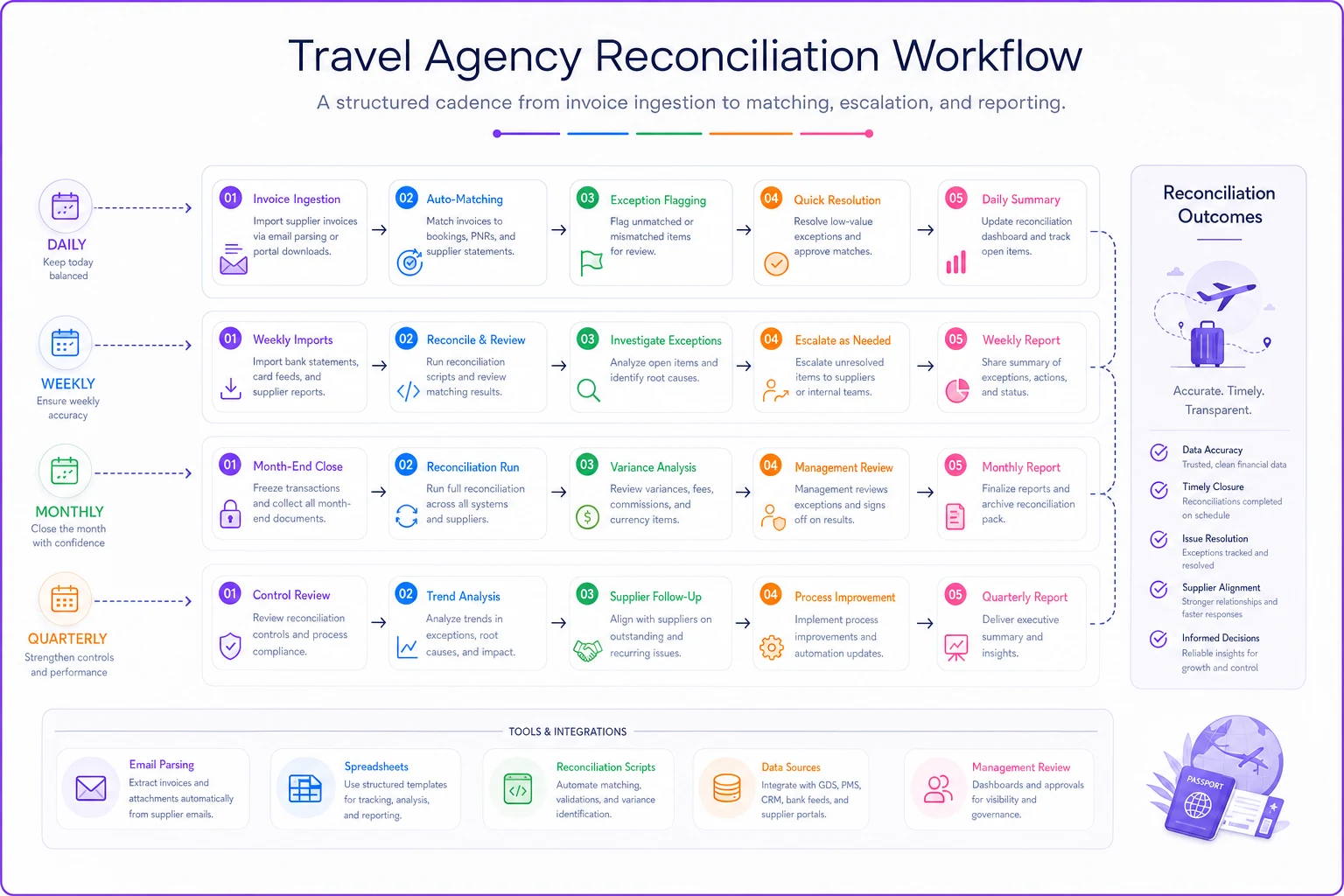
Daily (15 minutes)
-
Download new invoices from email
-
Enter into tracking spreadsheet
-
Flag anything urgent (departure within 72 hours)
-
Quick scan for obvious errors over $200
Weekly (2-3 hours)
-
Export booking data from reservation system
-
Run reconciliation matching
-
Investigate flagged variances
-
Send clarification emails to suppliers
-
Update modification documentation
-
Process approved adjustments
Monthly (4-5 hours)
-
Full reconciliation review
-
Commission audit against expectations
-
Supplier pattern analysis
-
Update automation rules based on new patterns
-
Generate reports for management
-
Clean up resolved items
Quarterly (full day)
-
Deep audit of one major supplier
-
Review and update field mappings
-
Refine flagging rules
-
Evaluate automation opportunities
-
Supplier relationship reviews
-
Process improvement planning
This workflow scales naturally. At 50 bookings, one person handles everything. At 200 bookings, split daily and weekly tasks between two people. At 500 bookings, dedicated reconciliation becomes necessary.
The key is maintaining the rhythm. Skip a week, and you're drowning in backlog. Skip a month, and you'll never catch up.
Moving beyond spreadsheets
Spreadsheets work until they don't. Somewhere around 200-300 bookings monthly, the cracks start showing. Formulas break when someone inserts a column in the wrong place. Files corrupt. Version control becomes a mess. Multiple people can't work simultaneously without conflicts.
This is where purpose-built operational software starts making sense. Not generic accounting software that doesn't understand travel bookings. Not enterprise systems that cost more than your annual revenue. Operational platforms designed specifically for travel agency workflows.
Modern AI-powered operational software handles the complex matching that breaks spreadsheets. It learns your supplier patterns, automatically extracts data from PDFs and emails, and flags issues based on your specific business rules. When a hotel invoice arrives, the system reads it, matches it to the booking, checks the amounts, verifies the dates, confirms the commission, and only surfaces issues that actually need human judgment.
The real value isn't just matching invoices—it's connecting reconciliation to your entire operational flow. When a discrepancy is found, the system can automatically email the supplier, create a follow-up task, update the client's booking record, and adjust your financial forecasts. Everything stays synchronized without manual updates across multiple systems.
But even with sophisticated automation, the fundamentals don't change. You still need clean data, clear processes, and consistent execution. Technology amplifies good processes—it doesn't fix broken ones.
Supplier invoice reconciliation doesn't have to drain hours from your week or dollars from your margins. The agencies that scale have moved beyond manual checking and reactive problem-solving. They've built systematic approaches that catch errors before they affect cash flow.
Start with the basics: map your fields correctly, build smart flagging rules, and create clear escalation paths. Use spreadsheet automation for what it handles well. Add lightweight scripts for repetitive tasks. Know when you've outgrown manual processes and need purpose-built tools.
The difference between agencies that scale and those that plateau often comes down to operational discipline. Every unbilled commission, every overpayment, every hour spent hunting through emails for invoice details—these seemingly small inefficiencies compound into real competitive disadvantages over time.
Whether you're processing 50 bookings or 500, the principles stay the same. Accurate reconciliation protects your margins, maintains supplier relationships, and keeps clients from experiencing billing surprises. The tools and automation levels change as you grow, but the need for systematic, consistent reconciliation never goes away.
Your next step is straightforward: audit your current reconciliation process, identify the biggest gaps, and implement one improvement this week. Start with field mapping if you don't have it. Add flagging rules if you're still reviewing everything manually. Build that escalation workflow if issues are falling through the cracks. Small improvements compound into operational advantages that separate professional agencies from those merely surviving.
Ready to elevate your travel agency workflow?
Join 1,200+ travel agencies using Travexly to save time, improve client satisfaction, and boost operational efficiency.